
1. The Core Bottleneck: What Engineering Flaw Does It Break?
Traditional product video production relies heavily on manual timeline alignment, Bézier curve adjustments, and SFX matching inside Premiere or After Effects. When engineering teams need to frequently ship feature updates, landing page promos, or release teasers, video production becomes a severe bottleneck slowing down the entire release cadence. Existing automation scripts remain largely restricted to static screenshot stitching or monotonous crossfades, failing to deliver the 2.5D spatial camera moves, beat-synced cuts, and film-grade audio backing required by modern software launches.
video-shotcraft abandons black-box cloud SaaS architectures in favor of packaging motion design capabilities into a standard AI agent skill. Developers can directly invoke a local codebase containing 157 structured motion recipe cards and 214 visual styles via Claude Code or Codex. The system precisely binds text, captures, camera trajectories, and SFX events to the Remotion rendering pipeline using declarative parameters, outputting pixel-accurate films directly on local workstations.
💡 Architectural Insight: By abstracting video editing into deterministic component-based state machines and declarative motion recipes, this architecture thoroughly eliminates the visual jitter and timing drift typical of AI-generated video.
2. Core Architecture and Data Flow Analysis
video-shotcraft runs within a local agent host environment. Upon receiving a user prompt, the agent parses intent, retrieves matching motion cards from the recipe library, and assembles them into a Remotion rendering context. The entire data flow is driven by a local CLI, avoiding the privacy risks and high compute bills associated with cloud rendering.
[ User / Claude Code ] ---> [ Intent Parser & Agent Skill ] ---> [ Shot Recipe Library (157+ cards) ]
                                                                      │
                                                                      ▼
[ JianYing / Workbench ] <--- [ Remotion Local Renderer ] <--- [ Normalized Progress Engine (t) ]
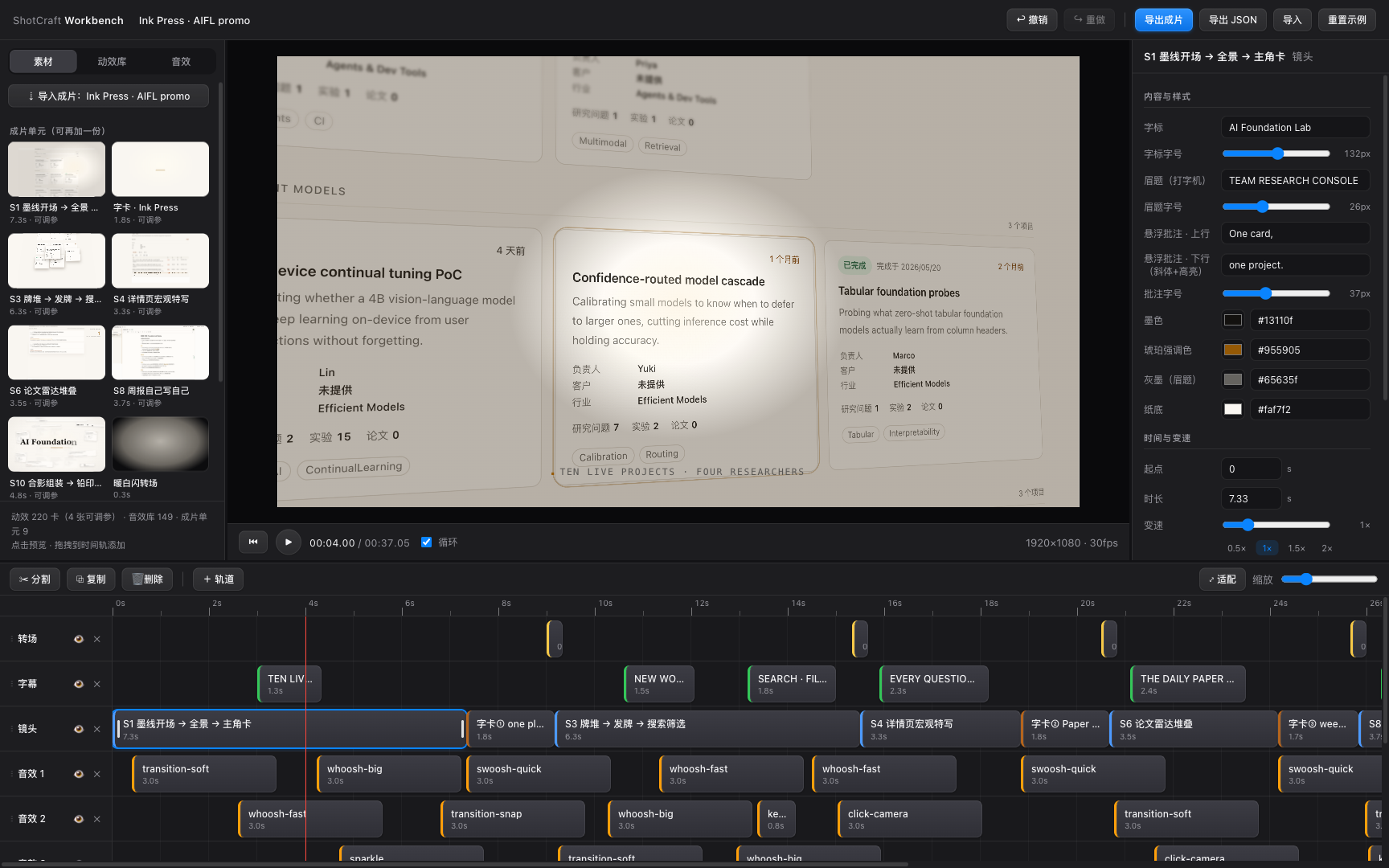
Execution relies on a normalized progress parameter $t$, with all motion components (located at demos/<category>/<name>/<Component>.tsx) driven by deterministic mathematical functions. This design guarantees absolute pixel parity between the preview environment and final render output. Post-delivery, developers can launch the browser-based Motion Workbench or export a JianYing Pro project draft to perform fine-grained secondary edits on subtitles, audio, and visual tracks.
3. Technical Selection and Hardcore Benchmarking
| Evaluation Dimension | This Scheme (video-shotcraft) | Traditional NLE (PR/AE) | Cloud-based AI Video SaaS | Production Benefit |
|---|---|---|---|---|
| Execution Medium | Local Agent Skill + Remotion | Local Desktop Closed Software | Cloud LLMs & Render Clusters | Zero network latency & data security |
| Timing Precision | Frame-accurate control (30/60 FPS) | Manual keyframing | Probabilistic gen, frequent drift | Eliminates manual rework |
| Asset Control | Open-source code & declarative recipes | Proprietary project files (.prproj) | Platform lock-in, video output only | Enables code refactoring & batching |
| Collaboration | Git version control & CLI automation | Binary files, hard to merge | Weak web collab, limited APIs | Seamless CI/CD and workflow integration |
| Learning Curve | Zero extra learning (Natural language) | Months of professional training | Simple prompt tweaking | Engineers can independently ship promos |
The core advantage of this selection brings video creation back into the software engineering domain. By managing motion configurations through Git, developers can incorporate promo generation into automated scripts, resolving the unversionable nature of traditional graphic software.
4. Hands-On Geek Guide: Building the Minimal Closed Loop
Deploying the local environment and letting the AI agent take over video generation requires the following initialization steps.
First, register the video-shotcraft skill globally using the skills CLI or manual symlinks:
# Globally register the skill using the skills CLI tool
npx skills add Vincentwei1021/video-shotcraft

# Or clone via Git and create a symlink in the Claude Code skills directory
git clone https://github.com/Vincentwei1021/video-shotcraft.git
cd video-shotcraft
ln -s "$(pwd)" ~/.claude/skills/video-shotcraft
Navigate to the project directory and install the required Node.js dependencies:
# Install Remotion and underlying rendering dependencies
npm install
Invoke the built-in Ink Press template or specify custom shot cards in Claude Code or any supported agent terminal:
Use video-shotcraft to create a promo for my desktop product using the deck-deal-flyin shot card and Ink Press theme.
After rendering completes, launch the Motion Workbench debug panel if browser-based tweaking is required:
# Start the local Workbench editor to fine-tune captions, colors, and shot order
node workbench/scripts/open.mjs my-product-project
5. Production Gotchas and Deployment Warnings
When scaling up production and generating video assets in bulk, pay close attention to the following performance and compatibility boundaries determined by the underlying architecture.
⚠️ Gotcha Warning [Node Out of Memory]: When rendering durations exceed 60 seconds or resolutions scale to 4K, local headless browser instances in Remotion can trigger V8 heap OOM errors. The workaround is explicitly increasing the Node memory limit in the render command:
NODE_OPTIONS="--max-old-space-size=8192" npx remotion render.⚠️ Gotcha Warning [JianYing Draft Version Lock]: Exported JianYing Pro compound drafts heavily rely on the host software's internal JSON schema. Upgrading major versions of JianYing Pro on macOS (e.g., from v11 to v12) may cause track misalignment. Batch production should be performed under a fixed client version, with project backups maintained prior to import.