
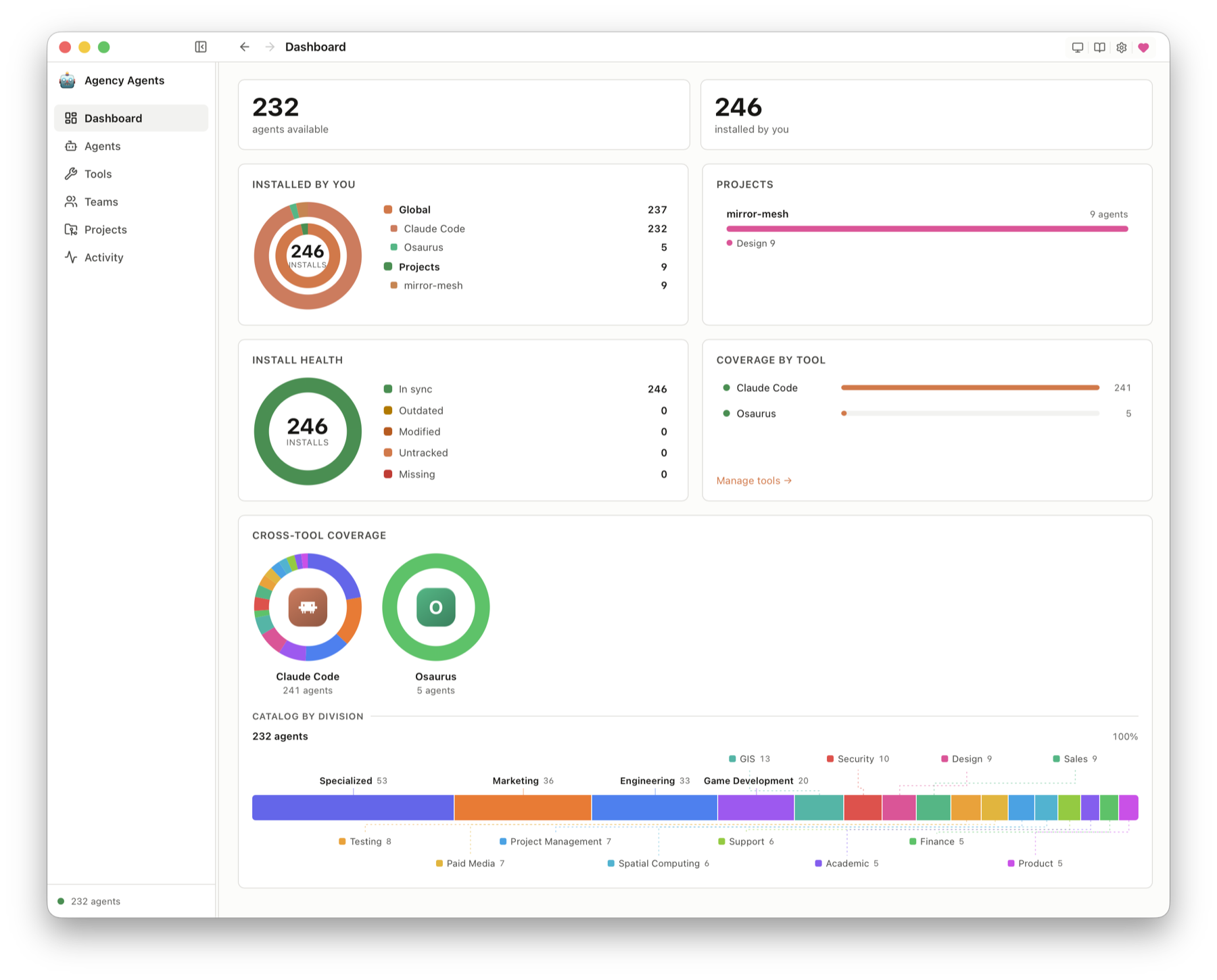
1. The Core Bottleneck: What Engineering Flaw Does It Smash?
AI coding tool ecosystems are severely fragmented. Claude Code reads ~/.claude/agents/*.md, Cursor relies on .cursor/rules/*.mdc, and Codex consumes ~/.codex/agents/*.toml. Developers must manually synchronize identical architect persona definitions across eight different directories, paying a heavy maintenance tax for minor format variations. While the upstream agency-agents repository provides a centralized catalog, it lacks a unified distribution terminal.
agar-agents-app supplies a native desktop control surface. It does not execute agent tasks or host runtimes, but instead focuses on deterministic persona rendering, multi-target install path mapping, and file drift monitoring. Developers browse divisions and roles within the interface, select target tools, and the app handles underlying file serialization and writes.
💡 Core Architectural Insight: By abstracting multi-tool configuration management into a local database coupled with a deterministic renderer, this project bypasses the lack of a unified package manager among AI coding tools, establishing a deterministic agent asset supply chain directly on developer workstations.
2. Core Architecture & Underlying Data Flow
agar-agents-app adopts a clean front-backend separation with rigorous security boundaries. A Rust-backed Tauri 2 core owns the asset catalog, renderer, install ledger, and file watch boundaries; the frontend utilizes SvelteKit and Svelte 5 for UI rendering. GitHub OAuth tokens remain securely isolated in the platform keychain, with the frontend accessing state strictly through controlled APIs.
[ Upstream agency-agents ] ---> [ Rust Catalog Engine ] ---> [ Deterministic Renderer ]
                                                                      │
                                                                      ▼
[ Local State Ledger ] <---> [ Drift Reconciliation ] <---> [ Target Tool Paths ]
The central engineering challenge of asset distribution is drift reconciliation. The application never blindly overwrites target files. Instead, it re-renders upstream source files, computes byte hashes, and compares them against local ledger records. File statuses are strictly classified as current, outdated, modified, removed, or foreign. This comparison mechanism allows developers to identify external modifications directly in the Dashboard, preventing manual adjustments from being silently wiped during updates.
3. Technology Selection & Hardcore Performance Comparison
| Evaluation Dimension | This Solution (agency-agents-app) | Traditional Paradigm (Shell Scripts/Symlinks) | Typical Cloud Control Plane | Production Return on Investment |
|---|---|---|---|---|
| Runtime Dependency | Pure local single binary (Tauri 2) | Bash / Python scripts depending on host env | Node.js service + PostgreSQL | Zero risk of external runtime crashes |
| State Consistency | Local immutable ledger + byte check | Stateless, highly prone to symlink decay | Relies on remote cloud database sync | Eliminates config drift and silent file loss |
| Data Privacy | Local-first, absolute zero telemetry | Zero telemetry, but lacks lifecycle tracking | Data stored on third-party servers | Meets enterprise-grade code asset compliance |
| Tool Extensibility | Unified tools.json declarative registry |
Hardcoded script paths, high modification cost | Dependent on platform API quotas | Adding tools requires modifying a single config file |
The technical selection heavily prioritizes local-first execution and extreme engineering efficiency. Tauri 2 avoids the massive memory footprint of Electron, while Svelte 5 ensures zero frame drops during the search of hundreds of agent personas. The tool registry completely decouples front and back ends; developers simply add a JSON entry and implement its byte renderer to integrate new tools.
4. Hands-on Geek Guide: Building a Minimal Closed-Loop from Scratch
Cloning the repository and initializing the development environment requires Node.js 22+ and stable Rust. The following steps are verified on mainstream macOS and Linux distributions.
# Clone the official repository into your local working directory
git clone https://github.com/msitarzewski/agency-agents-app

# Enter the project root directory
cd agency-agents-app

# Install frontend and Tauri dependency packages
npm install

# Launch the Tauri local debug development service
npm run tauri dev
To directly verify unit tests and frontend static analysis locally, execute the following command sequence:
# Execute frontend Svelte type and syntax checking
npm run check

# Run Rust backend core library unit tests
cargo test --manifest-path src-tauri/Cargo.toml --lib
Production release artifacts are built via the Phase C quality gate batch process:
# Run the local QA validation pipeline and build distribution artifacts
npm run build:phase-c
5. Production Gotchas & Avoidance Strategies
Integrating this application directly into team workflows in production requires close attention to specific boundary conditions and underlying storage behaviors.
⚠️ Gotcha Warning: Missing Platform Code Signing: On Windows x64 and ARM64 platforms, because release binaries lack full commercial code signing, Windows Defender SmartScreen triggers an unknown publisher warning. Developers must click 'More info' followed by 'Run anyway' to complete the installation. Enterprises should pre-deploy trust certificates via MDM.
⚠️ Gotcha Warning: Project-Scoped Override Pollution: When deploying agents into projects via Cursor or opencode, the app writes dot-directory files such as
.cursor/rules/directly into the project root. If teams fail to add these generated files to.gitignore, frequent byte-hash reconciliations will trigger massive unexpected git status modifications, polluting business commit histories.