
1. The Core Bottleneck: What Engineering Deadlock Did It Break?
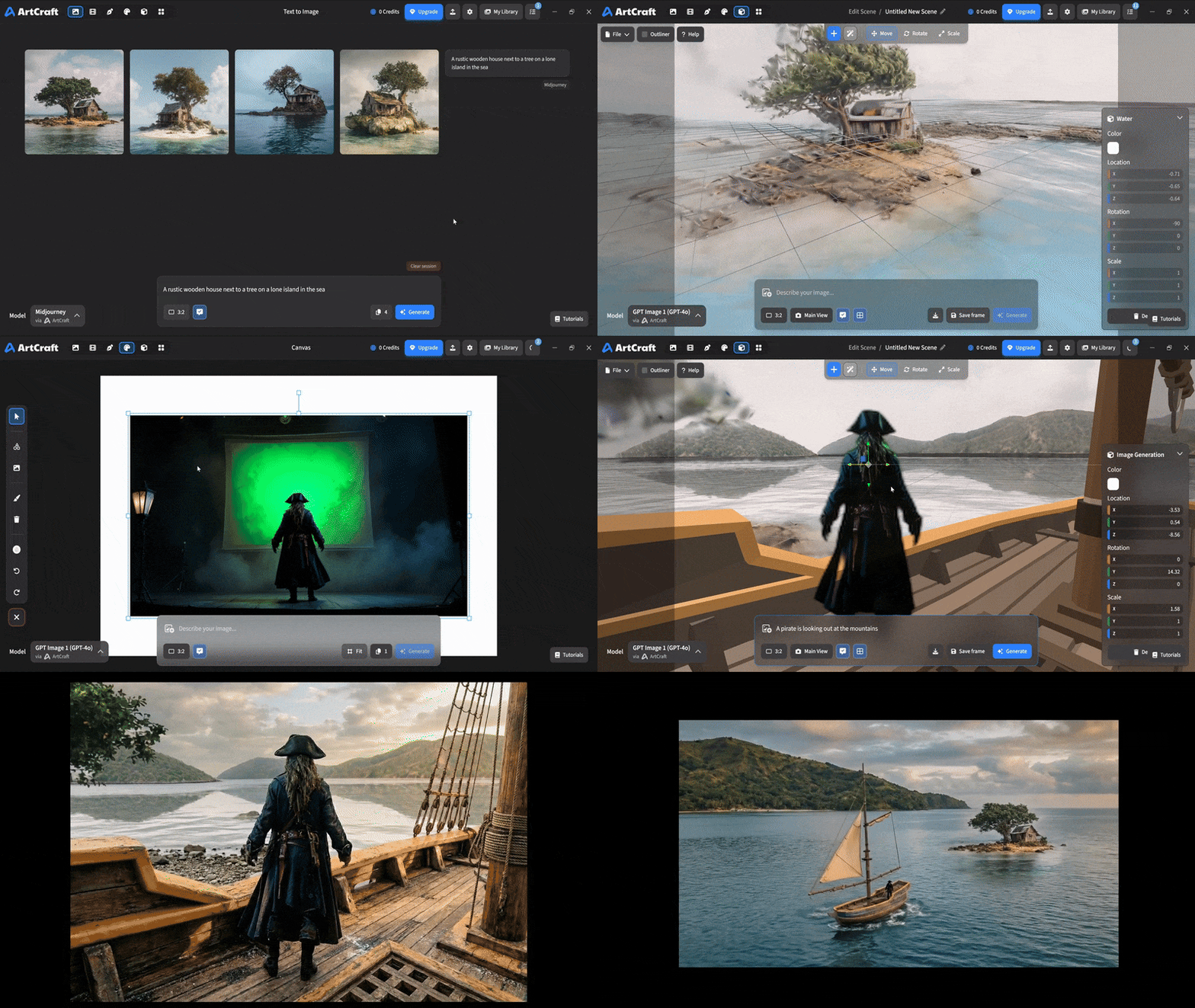
The bottleneck of deploying generative AI images and videos into production environments has never been model parameter scale, but rather the dismal control loop between human intent and the diffusion model's latent space. Traditional workflows relying purely on text prompts behave like probabilistic black boxes, where identical prompts output wildly random frames across sample runs. Focal lengths, character identities, and relative spatial positions spiral out of control with terrifying frequency. Engineers and creators cannot lock down intermediate states within the engineering chain, turning every iteration into a roll of the dice.
The artcraft project shatters this paradigm entirely. Instead of stacking more model contexts, it constructs a local Integrated Development Environment tailored for artistic creation. Developers can directly place props in virtual 3D space, build architectural structures, set character skeleton poses, and map these spatial layouts into model input conditions. This workflow shifts the interaction primitives, converging uncontrollable probabilistic generation into deterministic spatial choreography.
💡 Core Architecture Insight: By deeply coupling 3D spatial geometric constraints with image generation models, artcraft bounds the diffusion sampling process within rigorous visual boundaries, achieving WYSIWYG engineering controllability.
2. Core Architecture and Data Flow Analysis
artcraft adopts a decoupled, modular IDE architecture that separates spatial orchestration, asset rendering, and model inference into independent concurrent components. The client canvas captures user geometric operations, instantly generating spatial layout matrices, which are then dispatched to corresponding image transformation modules via a lightweight internal protocol.
[ Canvas / 3D Scene ] ---> [ Spatial Parser ] ---> [ Constraint Router ]
                                                          │
                                                          ▼
[ Local Model Engine ] <--- [ Tensor Normalizer ] <--- [ Asset Kitbasher ]
In this data flow, the Spatial Parser translates user clicks and translations on the 2D canvas or 3D scene into standardized positional tensors. The Constraint Router extracts hard constraints such as character identity features and mesh topologies. The Asset Kitbasher combines model slices and background removal results, and finally, the Tensor Normalizer feeds the structured data into local or remote model inference engines.
The architectural trade-off here sacrifices frontend lightweight simplicity for stability in processing multimodal mixed assets. Because data formats across every component remain highly standardized, developers can plug in custom diffusion models, depth estimators, or 3D mesh generators at will without refactoring the entire rendering pipeline.
3. Technology Selection and Hardcore Performance Benchmarking
| Dimension | This Project (artcraft) | Traditional Paradigm | Typical Competitor | Production Benefit |
|---|---|---|---|---|
| Control Precision | 3D spatial coordinates & pose hard constraints | Text prompts + ControlNet | Web UI parameter sliders | Eliminates identity drift & composition errors, cuts 80% rework |
| Asset Management | Local IDE unified orchestration | Fragmented local file storage | Cloud-closed asset libraries | Full data privacy, avoids cloud transit latency and leaks |
| Model Adaptation | Open model choices, heterogeneous local support | Bound to specific cloud APIs | Single closed-ecosystem model | Escape vendor lock-in, balance inference cost and quality |
| Interaction Primitive | Visual IDE, 2D/3D hybrid workflows | Web dialog iterative debugging | Plugin single-function tools | Boosts dev efficiency for continuous shots & multi-camera projects |
Underlying this technology selection is a pragmatic core logic. Recognizing the performance bottlenecks of web-based SaaS tools when handling massive 3D assets and high-concurrency tensors, it returns to a native desktop client IDE architecture. By directly invoking local GPU compute and pushing complex visual composition logic down to local execution, it fundamentally guarantees the professional creator's strict demands for low latency and absolute privacy.
4. Hands-on Geek Practice: Building the Minimum Viable Loop from Scratch
To run artcraft's development version locally, clone the repository and configure the build environment. According to official documentation, the project requires Node.js and a modern graphics compilation toolchain.
Fetch the source code and install base dependencies first:
# Clone the official repository
git clone https://github.com/storytold/artcraft.git

# Enter the project root directory
cd artcraft

# Install frontend and desktop main process dependencies
npm install
Here is the minimal core configuration script for launching the local dev environment (TypeScript example demonstrating canvas initialization and 3D scene mounting):
import { ArtCraftWorkspace } from '@artcraft/core';
import { SceneEngine, MeshTransformer } from '@artcraft/engine';

// Initialize workspace instance, specifying local render backend and hardware acceleration tier
const workspace = new ArtCraftWorkspace({
  renderMode: 'webgpu', // Enable modern WebGPU render pipeline for peak throughput
  maxMemoryLimitMB: 4096, // Set max tensor cache threshold to prevent OOM
  enableHardwareAcceleration: true
});

// Mount 3D scene engine to handle subsequent spatial positioning and character placement
const scene = new SceneEngine({
  gridSize: 100,
  snapToGrid: true
});

// Bind image-to-3D mesh transformer to convert 2D assets into positionable mesh objects
const transformer = new MeshTransformer(scene);

async function bootstrap() {
  // Start local debug server and listen on specified port
  await workspace.initialize();
  console.log('ArtCraft IDE initialized successfully on port 9527.');
}

bootstrap().catch(console.error);
Execute npm run dev in the terminal to invoke the desktop debugging interface, load local model weights, and begin spatialized visual creation.
5. Production Gotchas and Pitfall Avoidance
⚠️ Pitfall Warning [WebGPU Compatibility & Driver Crashes]: On certain legacy Linux drivers or dual-GPU switching laptops, the WebGPU render backend may cause screen flickering or main process crashes. If encountered, explicitly downgrade via startup flags
--disable-webgpu, forcing a fallback to the stable WebGL rendering pipeline to ensure stability.⚠️ Pitfall Warning [Local Model VRAM Out of Memory (OOM)]: Simultaneously loading the 3D scene renderer, multi-view ControlNets, and diffusion models easily exhausts VRAM. It is recommended to enable Dynamic VRAM Offloading in settings and limit batch sizes to 1, preventing high-resolution rendering from triggering OS memory protection kills.