
1. The Core Bottleneck: What Architectural Flaws Does It Smash?
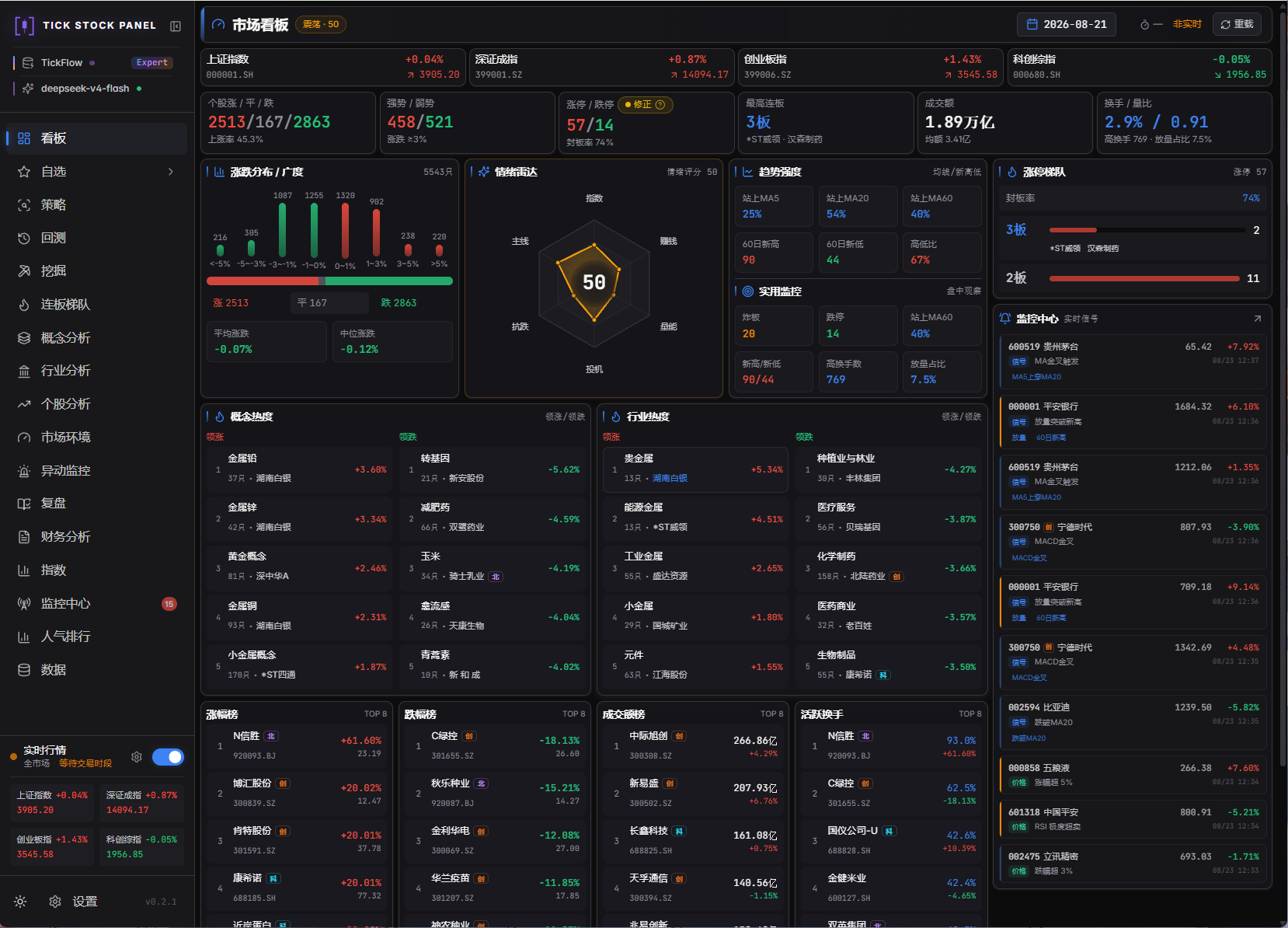
Building an in-house A-share quantitative trading system often leads to a fragmented mess of heterogeneous scripts. Market data sources are tightly coupled to specific SDKs, forcing total rewrites when switching vendors. Screener scripts, backtesting engines, and intraday monitoring pipelines rely on isolated databases, resulting in logical drift due to mismatched indicator calculation formulas. Meanwhile, quantitative AI assistants usually remain restricted to superficial text Q&A, incapable of safely executing underlying trading strategies or backtest pipelines. tick-stock-panel tackles this through a self-hosted single-container architecture and a unified enriched data spec, consolidating data routing, indicator pipelines, backtest research, and AI execution engines into a single control plane.
💡 Core Architectural Insight: By normalizing multi-source data into local Parquet files and isolating upstream changes via a capability routing matrix, this architecture establishes a deterministic contract from raw ticks to AI-driven actions while keeping operational overhead near zero.
2. Core Architecture and Underlying Data Flow
Core calculations rely on the Polars in-memory vectorized engine, combined with local Parquet file persistence for high-performance queries. The underlying data synchronization pipeline pulls raw market data via pluggable data sources, streams through the indicator pipeline to compute 68 core metrics and signals, and finally persists them as enriched data. The AI chat assistant interacts through the Model Context Protocol (MCP) and 61 open API endpoints, with any write operation strictly enforcing a confirmation card mechanism.
[ Third-party Data Sources ] ---> [ Capability Routing Matrix ]
                                              │
                                              ▼
[ AI Clients / MCP ] <---> [ API Gateway (61 Endpoints) ]
                                              │
                                              ▼
                              [ Polars Calculation Engine ]
                                              │
                                              ▼
                              [ Local Enriched Parquet Disk ]
Data flow adopts an explicit layered design within the architecture. Computation tasks are automatically routed to corresponding execution pools based on strategy lifecycles, and historical backtests share identical signal definition libraries with real-time monitoring, eliminating indicator inconsistencies caused by traditional multi-system setups.
3. Technical Selection and Hardcore Performance Benchmark
| Selection Dimension | This Solution (tick-stock-panel) | Traditional Python Scripting | SaaS Quant Platforms | Commercial Broker Terminals |
|---|---|---|---|---|
| Data Storage | Local Parquet, zero external DB | Messy CSV/SQLite files | Cloud proprietary database | Closed proprietary formats |
| AI Integration | 12 MCP tools + 61 API endpoints | No native API, needs scraping | Built-in sandbox black box | No open integration support |
| Market Scanning | Polars millisecond-level vectorized | Pandas single-thread loops | Server-side rate-limited queues | Dependent on local client power |
| Self-Hosting | Docker single-container | Heavily dependent on local env | Closed-source cloud environment | Pure client with zero backend |
| Extensibility | Open contractual APIs & tokens | No unified interface specs | Expensive and limited APIs | Impossible to modify core logic |
As shown in the benchmark table, while maintaining data sovereignty via self-hosting, this project exposes a complete read-write execution loop to AI clients via the MCP protocol, completely breaking the data silos and customization limits of commercial terminals.
4. Hands-On Geek Guide: Building a Minimal Production Loop
Quickly spin up the local quantitative workbench using Docker without configuring complex external dependencies like PostgreSQL or Redis.
# Clone the official repository locally
git clone https://github.com/shy3130/tick-stock-panel.git
cd tick-stock-panel

# Configure the environment variable file to specify data storage and API keys
cp .env.example .env

# Start the single-container self-hosted instance using Docker Compose
docker compose up -d --build
Once started, the service listens on the local port by default. Below is a minimal production script in Python calling its open API to execute a market strategy scan:
import httpx

# Define the local workbench API base URL and access token
API_BASE_URL = "http://localhost:8000/api/v1"
API_TOKEN = "your_generated_token_here"

headers = {
    "Authorization": f"Bearer {API_TOKEN}",
    "Content-Type": "application/json"
}

# Dispatch a millisecond-level market-wide strategy scan request
response = httpx.post(
    f"{API_BASE_URL}/screener/run",
    json={"strategy_id": "momentum_breakout_v1", "date": "2023-10-25"},
    headers=headers,
    timeout=30.0
)

# Parse the returned quantitative signal structure
if response.status_code == 200:
    result_data = response.json()
    print(f"Scan successful, triggered symbols count: {len(result_data.get('signals', []))}")
else:
    print(f"API call failed, status code: {response.status_code}, error: {response.text}")
Running this script will output the stock signals filtered by the target strategy on the specified trading day.
5. Production Gotchas and Avoidance Strategies
When deploying this system to production or performing high-frequency secondary development, pay close attention to local file locks and concurrency performance boundaries. Although Parquet files provide exceptional compression ratios and query performance, simultaneous multi-process writes can trigger file handle conflicts.
⚠️ Gotcha Warning [Concurrent Write Conflicts]: When writing custom data synchronization scripts, multiple cron jobs must never write to the exact same daily K-line or Enriched Parquet partition simultaneously. Disk persistence operations must be serialized through internal task dispatch pipelines.
When large language models trigger write operations via MCP, a default 120-second timeout confirmation card mechanism is enforced. Users must promptly click confirmation in the frontend interface, otherwise pending action parameters will automatically void.
⚠️ Gotcha Warning [AI Action Timeout Expiry]: When the AI assistant invokes write tools involving strategy generation or watchlist modifications, ensure manual approval is granted within the frontend control panel's pending confirmation card inside 120 seconds, or the automation pipeline will actively abort the change due to safety timeouts.