
1. The Core Bottleneck: What Engineering Deadlock Does It Smash?
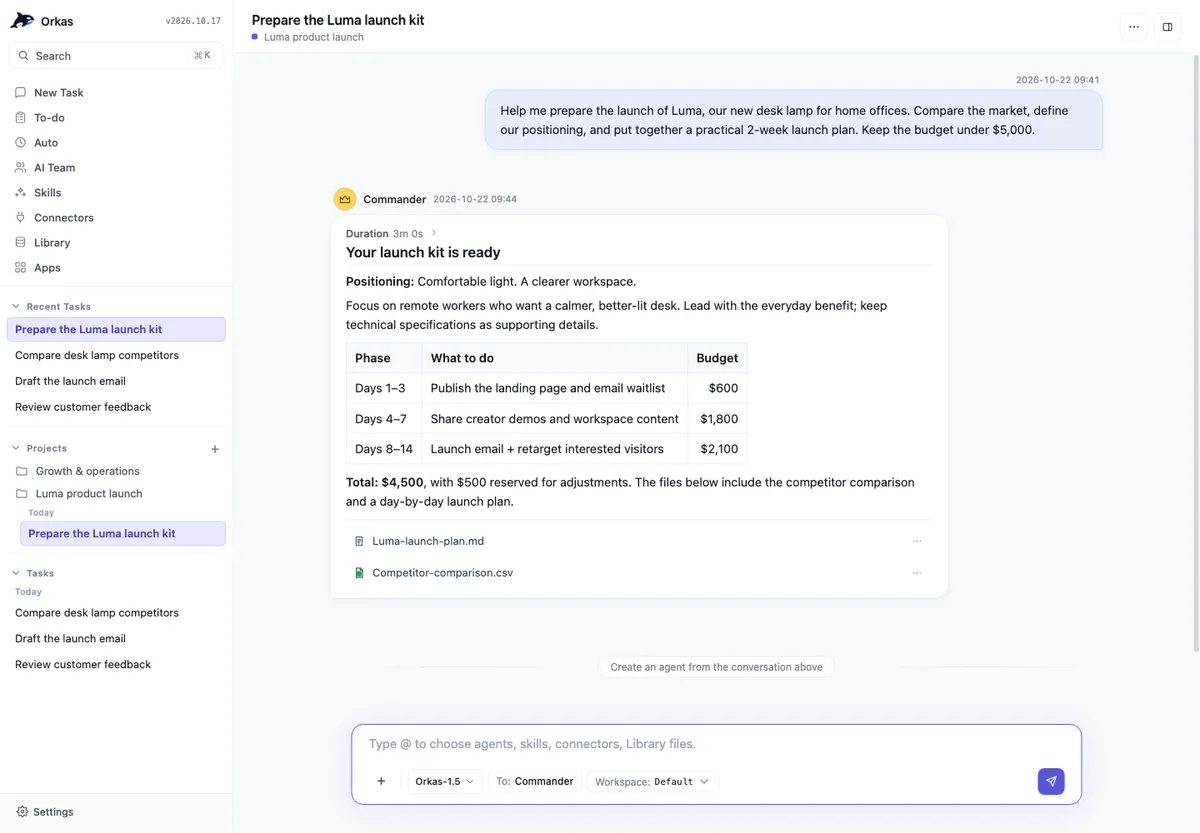
Traditional desktop AI clients remain trapped in a single-turn conversational contract. Users input a prompt, the model returns text or code snippets, and the context resets immediately. All project states, file modifications, and subsequent actions are forced onto human manual glue. This stateless interaction model introduces extreme cognitive friction when processing long-running, multi-step business tasks. Developers are forced to manually ferry data across disparate tools. Orkas bypasses the pure chat box illusion by transforming the entire desktop workspace into a local orchestration sandbox. It uses persistent Project entities to record state and rules, To-do lists to break down granularities, and an Auto-advance loop engine to drive agents autonomously to the next milestone, shifting AI from a reactive query tool into a continuous delivery workforce.
💡 Architectural Insight: Through local-first, file-level persistence and dynamic agent dispatch, Orkas completely eradicates the stateless silo effect of traditional LLM clients, enabling true cross-session workflow continuity.
2. Core Architecture & Underlying Data Flow Analysis
The underlying layer of Orkas consists of a local control center, a dynamic execution engine, and a multimodal tool suite. When a user issues a macro objective to the Commander, the Commander avoids monolithic processing; instead, it parses the goal into executable sub-tasks and dynamically routes them to one of 16 built-in specialist agents. Each agent maintains dedicated access to Skills, Memory, and Tools. All state transitions, file reads, and writes persist directly within the local Project directory, guaranteeing seamless recovery from any checkpoint after an interruption.
[ User / Commander ] ---> [ Dynamic Task Parser ] ---> [ Agent Routing Matrix ]
                                                            │
             ┌──────────────────────────────────────────────┘
             ▼
[ Local Project State ] <---> [ Execution Sandbox ] <---> [ File & Tool Connectors ]
In its underlying data flow design, Orkas strictly adheres to a local-first philosophy. All external interactions trigger via controlled Connectors. Actions targeting Gmail, Notion, Shopify, or the local file system undergo security boundary validation prior to execution. This design locks down the systemic risk of sensitive credential leakage while maintaining automation velocity, giving engineering teams the confidence to entrust production-grade data to a local multi-agent cluster.
3. Technology Selection & Hardcore Performance Comparison
| Selection Dimension | This Solution (Orkas) | Traditional Paradigm | Typical Competitor | Production Benefit |
|---|---|---|---|---|
| State Persistence | Local Project directory & state machine | Browser memory / single-session loss | Cloud-closed loop storage | Zero data privacy risk, seamless cross-session resume |
| Task Orchestration | Commander dynamic parsing & sub-agent routing | Manual copy-paste & multi-window switching | Fixed workflow template orchestration | Adaptive topological expansion for unknown long-cycle tasks |
| Ecosystem Access | 16 built-in specialists + 30+ marketplace extensions | Single general-purpose model endpoint | Bound to specific closed-source AI ecosystems | Freedom to switch endpoints like Claude, DeepSeek, or local models |
| Automation Trigger | Auto-advance loop + scheduled task alignment | Entirely dependent on manual passive input | Pure API triggers without desktop UI | Unattended continuous production of periodic business assets |
This technology selection draws a hard line between utility software and system-level productivity agents. Traditional paradigms rely heavily on developer attention to maintain context, whereas Orkas reduces maintenance cost to near-zero through state machine persistence and scheduled task catch-up mechanisms.
4. Hands-on Geek Guide: Building the Minimal Closed Loop from Scratch
Deploying Orkas in a development or production desktop environment requires no complex source compilation. Installation proceeds directly via official desktop distribution channels.
# Fetch the official desktop installer for your target OS platform
curl -sSL https://orkas.ai/download/?source=gh-orkas&entry_point=github_readme&download=1 -o orkas_installer

# macOS: Mount DMG and drag into Applications (Windows: Run setup executable directly)
# Upon initial launch, the system automatically initializes the local SQLite state store and default 500 credits

# Verify local OpenAI-compatible endpoint configurations if bypassing the built-in Orkas model
export ORKAS_DEFAULT_PROVIDER="openai"
export ORKAS_API_KEY="your_api_key_here"
After launching the application, create a new Project and input your engineering or research goal (e.g., "Analyze the technical architecture of the target competitor website and output an actionable refactoring PRD"). The Commander automatically generates a To-do list, delegates execution to UIDesigner and ProductDeveloper, and ultimately yields a complete Markdown deliverable within your local workspace.
5. Production Gotchas & Avoidance Strategies
Deploying multi-agent automation into real business delivery scenarios requires strict vigilance regarding local compute resource constraints and asynchronous concurrency boundaries.
⚠️ Gotcha Warning [Scheduled Task Cold-Start Miss] : Starting from v1.9, although scheduled automations catch up on the most recent missed run within 12 hours of system wake or app launch, keeping the local machine completely powered down or hibernating beyond the threshold causes the automation script for that cycle to skip silently, requiring manual alignment.
⚠️ Gotcha Warning [External Tool Automation Overreach] : While Orkas Connectors (such as Gmail, Shopify, Stripe) incorporate high-security confirmation gates by default, configuring automation scripts to execute batch deletions or high-frequency writes via full Auto-advance risks production data corruption due to front-end instruction parsing bias. All tool invocations involving high-risk modifications must keep manual review gates active.