
1. The Core Bottleneck: What Engineering Deadlocks Does It Break?
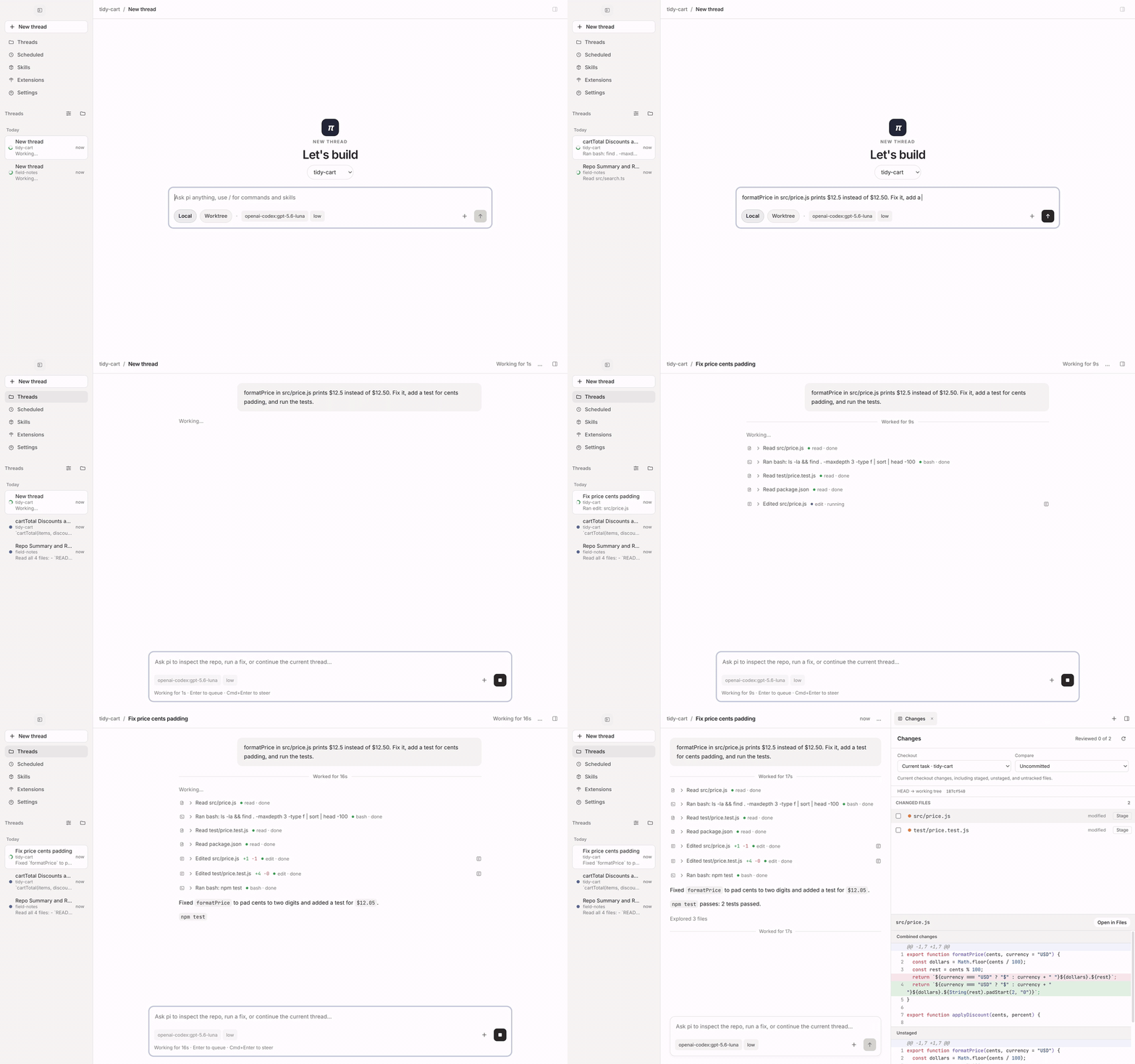
Traditional terminal-based coding agents exhibit severe blocking behavior when handling high-frequency concurrent tasks. Developers executing modification commands in a single-threaded terminal are forced to halt active work while waiting for completion. Spinning up multiple terminal processes exponentially increases context-switching overhead and frequently triggers file conflicts when multiple agents modify the same checkout simultaneously. pi-gui restructures the interaction boundary between desktop environments and agents by binding each AI task to an isolated thread and a dedicated Git worktree. Developers monitor multiple running inference instances via the sidebar, execute test suites inside embedded terminals, and review changes file-by-file through a dedicated Review tab.
💡 Core Architecture Insight: pi-gui avoids rewriting agent reasoning logic, serving instead as a high-performance desktop shell mounted directly on top of
@earendil-works/pi-coding-agent, utilizing session JSONL files as the single source of truth for zero-latency CLI-to-desktop state synchronization.
2. Architecture & Data Flow Analysis
The entire system relies on a standard Electron architecture, where the Main Process manages window lifecycles, child process spawning, Git worktree creation, PTY terminal dispatching, and scheduled task triggers. The Renderer Process builds timelines, composers, and workbench panels using React, communicating with the main process exclusively through strongly typed IPC boundaries. A minimal Preload script exposes a restricted bridge, cutting off direct Renderer access to Node.js underlying APIs.
[ React Renderer ] --( Typed IPC )--> [ Electron Preload ]
                                              │
                                              ▼
[ pi-sdk-driver ] <--- [ Electron Main Process ] <--- [ Disk JSONL ]
        │
        ▼
[ pi-coding-agent Runtime ] ---> [ Git Worktree / PTY Terminal ]
The packages/pi-sdk-driver acts as a lightweight adapter interfacing with the upstream pi runtime. The system maintains no independent persistent database; all chat transcripts and state modifications persist directly in JSONL format on disk, ensuring developer credentials, OAuth tokens, and custom skills configured in the CLI work seamlessly out-of-the-box.
3. Technology Selection & Hardcore Benchmarks
| Evaluation Dimension | pi-gui Solution | Traditional Terminal CLI | Web-Based SaaS Platform | IDE Extension (e.g., Continue) | Production Yields |
|---|---|---|---|---|---|
| Concurrency Isolation | Isolated Git Worktree + Multi-threads | Multiple terminal tabs, conflict-prone | Cloud sandboxed, hard to debug locally | Shares active IDE context | Zero task interference and conflicts |
| State Persistence | Direct local JSONL read/write | Local file read/write | Cloud database storage | Local plugin cache | Zero data migration, seamless CLI parity |
| Terminal & Review | Native PTY terminal & Review tab | System terminal switching | Simulated web console, limited features | IDE dependent terminal | Single-window verification loop |
| Network Latency | Direct local API connection | Direct local API connection | Proxied via third-party servers | Direct local API connection | Zero middleware latency overhead |
| Ecosystem Extension | Inherits all pi skills & extensions | Inherits all pi skills & extensions | Closed ecosystem, platform-locked | IDE marketplace dependent | Preserves existing ecosystem investments |
The benchmark demonstrates that pi-gui preserves uncompromising local control while leveraging Electron desktop rendering to bridge the gap left by traditional CLIs in visual code review and multi-task orchestration.
4. Hands-On Minimal Production Loop
Deployment is achieved via official Homebrew channels or pre-compiled binaries from the release page. The following sequence demonstrates rapid installation and execution of an isolated workflow on macOS.
# Add the official third-party Homebrew tap repository
brew tap minghinmatthewlam/tap

# Install the pi-gui desktop client via cask
brew install --cask pi-gui

# Verify underlying pi CLI dependencies are ready post-launch
npx @earendil-works/pi-coding-agent --version
Launch pi-gui, navigate to Settings → Providers to configure your model API key or complete OAuth authentication. Click New thread, select the Worktree mode, input your prompt, and the system executes the agent within an isolated Git branch while streaming runtime execution logs in real time.
5. Production Gotchas & Mitigation Strategies
Scaling agent workflows with Git worktrees in production requires proactive mitigation of dependency conflicts and resource contention.
⚠️ Gotcha Warning [Git Worktree Dependency Bloat]: When agents frequently install Node modules or run build scripts inside isolated worktrees, disk consumption escalates rapidly. Execute
git worktree pruneregularly and clean up unused development branches to prevent local storage depletion.⚠️ Gotcha Warning [Multi-Thread Token Exhaustion]: Running multiple agent threads concurrently, each maintaining independent context windows and continuous inference cycles, easily breaches provider rate limits within tight timeframes. Configure appropriate thinking levels per thread in settings or assign lighter, faster models to non-critical tasks.