
1. The Core Bottleneck: Making Animation Is Exhausting — Not in Generation, but in Repetitive Operations
The ordinary AI video workflow is a loose chain: write the script first, then generate images, then make the video, then dubbing, editing, and subtitles. Every step needs human intervention. For a 30-second episode, the operation steps can pile up past 50.
Honglian Mozun's goal is direct: feed in a theme, and let the AI complete the script, storyboard, characters, animation, dubbing, subtitles, and final film as automatically as possible. What he built is not "using AI to generate a video" but an animation production system built with Muse Spaces that can be reused again and again. In his project, Spaces plays the role of the entire video production workbench, not just a video generation entry point.
His hard targets for the system: ages 3–6, children's English early learning, 30–45 seconds, 9:16, 1080×1920, original cute 3D cartoon style, zero-basics English, and a real playable MP4 output. The author himself adds a caveat: these parameters are his project goals, and readers can change them to fit their own needs — it does not mean every Muse environment supports all of these settings directly.
💡 Architectural Core Insight: The real dividing line in this approach is not "whether it can generate" but "whether it can be reused." Anyone can generate once. The hard part is making episode two and episode ten reuse the same characters, the same workflow, and the same quality bar. The value of Spaces is that the workflow itself becomes an asset, instead of treating every episode as a brand-new task starting from zero.
2. Core Architecture and Data Flow: One Space, a Five-Stage Pipeline
The whole system has a single entry point: a Muse Space called "AI Children's English Animation Automated Production Center." A theme goes in, an MP4 comes out, passing through five stages:
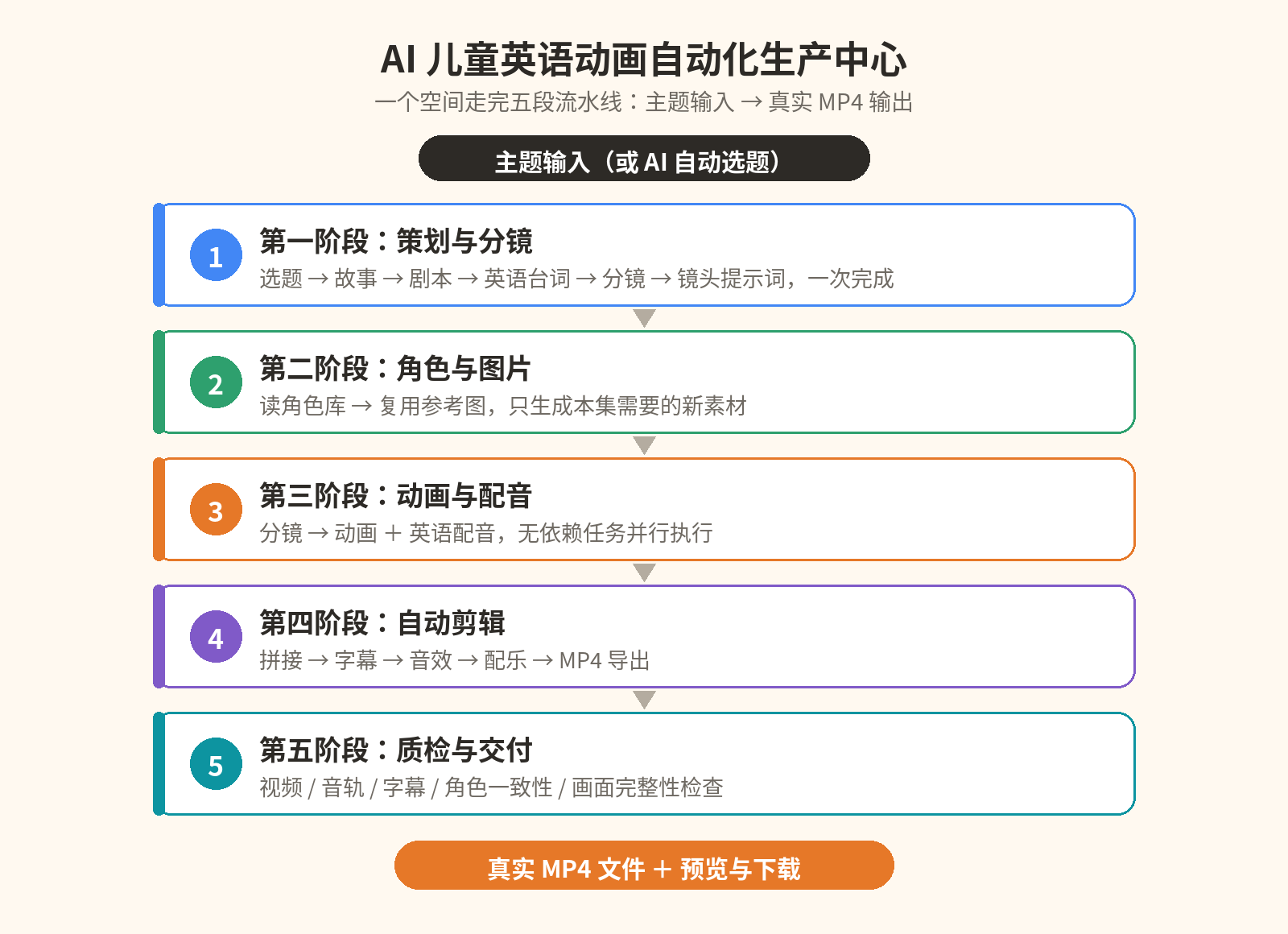
Figure: the five-stage pipeline — theme in, real MP4 out
Video: a walkthrough of the five-stage pipeline (generated by Muse, 10 seconds)
This five-stage structure is not what version one looked like. The first workflow had more than 50 execution steps, all independent tasks from topic selection to the final film. What the author worried about was not the step count itself, but the repeated planning, context transfer, and unnecessary token consumption that came with it. His optimization instruction is explicit: do not just fold 50+ steps into 5 on the interface — optimize the actual execution logic.
Nine hard requirements for the optimization are worth quoting in full: avoid re-planning the whole story; do not re-think the entire workflow for every shot; do not repeatedly pass the full chat history; prioritize reusing existing assets; cut meaningless status reports; when editing a single shot, update only the affected content; use programs for deterministic editing tasks; keep the necessary real generation steps; never fake task status or MP4 files. The last one is the red line of the whole system.
The system offers two modes: A. One-click full auto — after entering a theme it runs automatically, minimizing manual confirmation; B. Staged and controllable — allows editing the script, characters, shots, dubbing, and subtitles, keeping other finished assets as much as possible when one shot is changed.
3. Technology Selection: Why Spaces Instead of a Loose Toolchain
| Dimension | Loose AI video chain (script → images → video → dubbing → editing) | Muse Spaces workbench (this approach) |
|---|---|---|
| Workflow carrier | Every episode rebuilds the workflow from scratch, steps scattered across tools | One long-lived space; the workflow itself is resident and reusable |
| Step scale | First version: 50+ independent tasks, heavy repeated planning | Compressed into 5 core stages, one planning pass, one storyboard pass |
| Character consistency | Re-generating the lead every episode: round face becomes long face, clothes and voice all change | Permanent character asset library, reference images and fixed settings reused first |
| Edit cost | Changing one shot often forces the whole chain to re-run | Only the affected content is updated, the rest is kept |
| Dubbing & lip-sync | Video and dubbing generated separately, mouths often miss the lines | Prefer narration, wide shots, and few frontal speaking shots; use a dedicated lip-sync tool when needed |
| Delivery check | A task card showing "done" counts as done | Must verify a real video file, audio track, and playable MP4 |
| Best for | One-off tries, quick single clips | Creators who want to keep publishing a series |
The conclusion of this comparison is not "which is stronger" but "which fits continuous production." A loose chain is not slow for one clip, but episode two forces you to rebuild the workflow again; Spaces costs more to set up, but from episode two on, the marginal cost is where it really drops. The author's final goal confirms this: it is not to produce one animation, but to build a system that keeps producing different animated content — later, just swap the theme and reuse the characters and workflow.
The character library is the most critical asset in the system. The author designed three starter characters: Star Bunny — lively and curious, guides the learning; Bubu Bear — honest and humorous, handles story interaction; Mimi Deer — gentle and smart, explains the knowledge. Each character stores seven items: name and ID, standard look and reference image, fixed costume and colors, personality traits, voice configuration, generation prompt, and visual style. When making a new video, pick from the existing library first. Each episode can use one, two, or three leads — not all three at once. New characters may be added for a plot, but adding a permanent character needs the author's confirmation.
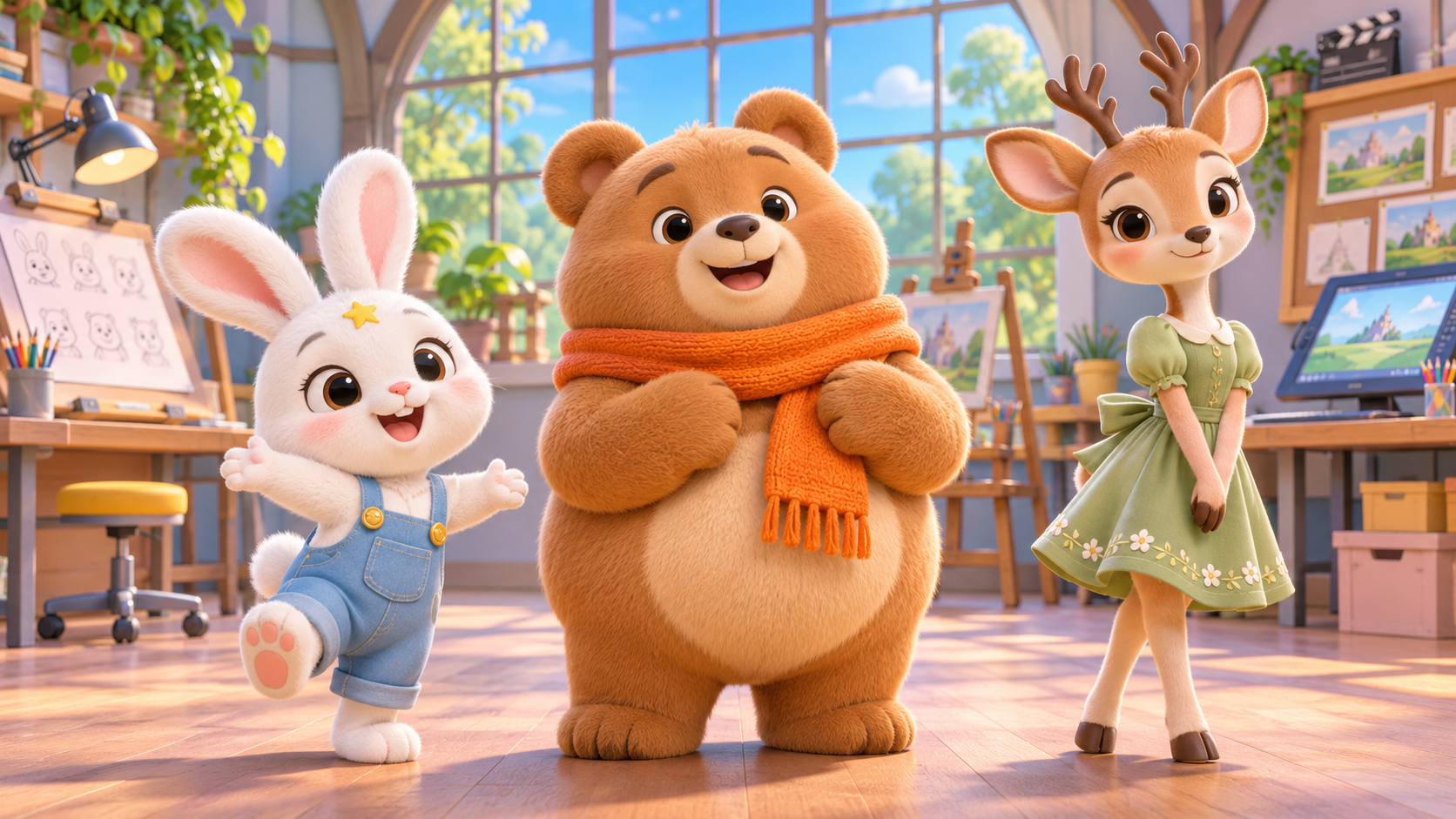
Figure: Star Bunny, Bubu Bear, and Mimi Deer (illustration drawn from the original post's descriptions, not the author's original character art)
The author stresses one point in particular: character reuse does not mean using the same image every episode. It means keeping the character's identity while showing new actions and expressions in different stories. But this only lowers the chance of character drift — it cannot guarantee full consistency. That is one of the rare, refreshingly honest statements in the original post.
4. Hands-On Geek Guide: Four Prompts, from Building the Space to Self-Diagnosis
The four prompts below are the author's published core versions, ready to copy and try. They are organized from his original wording, keeping the intent and key phrasing.
Core Prompt A: Create the Animation Production Center
You are now my AI video production director, technical lead, and automated workflow executor.
Please create a long-lived children's English animation workspace in Muse Spaces. Space name: AI Children's English Animation Automated Production Center.
Goal: when I enter a video theme, or ask the AI to auto-select a topic, complete the whole video production workflow as automatically as possible. The tasks include: 1. Auto-select an English teaching theme; 2. Write an English script for ages 3–6; 3. Design the full story and storyboard; 4. Create or reuse cartoon characters; 5. Generate scenes and storyboard images; 6. Turn the storyboard into animation; 7. Generate natural, clear English dubbing; 8. Add sound effects and subtitles; 9. Auto-edit and assemble the video; 10. Check video quality; 11. Export a real playable MP4.
Default to the original 3D cartoon style. Offer two modes: A. One-click full auto — runs automatically after a theme is entered, minimizing manual confirmation; B. Staged and controllable — allows editing the script, characters, shots, dubbing, and subtitles, keeping other finished assets as much as possible when one shot is changed.
Note: I want a real working video production system, not a static webpage that shows the workflow. Every button, progress bar, and download must map to a real task and file. If the current environment lacks a necessary tool or permission, say so clearly — do not fake success.
Core Prompt B: Streamline the Workflow (50+ Steps → 5 Stages)
Please review the execution flow of the current animation workspace. It has more than 50 steps and needs to prioritize execution efficiency. Do not just fold the 50+ steps into 5 on the interface — I want the actual execution logic optimized.
Please organize the whole production flow into 5 core stages: Stage 1: Planning & Storyboard — finish topic selection, story, script, English lines, storyboard, and shot prompts in one go. Stage 2: Characters & Images — read the existing character files, reuse character reference images, and generate only the new assets this project needs. Stage 3: Animation & Dubbing — generate animation and English dubbing from the storyboard, allowing independent tasks to run in parallel. Stage 4: Auto Editing — finish video stitching, subtitles, sound effects, music, and MP4 export. Stage 5: QA & Delivery — check the video, audio, subtitles, character consistency, and frame integrity.
Optimization requirements: 1. Avoid re-planning the whole story; 2. Do not re-think the entire workflow for every shot; 3. Do not repeatedly pass the full chat history; 4. Prioritize reusing existing assets; 5. Cut meaningless status reports; 6. When editing a single shot, update only the affected content; 7. Use programs for deterministic editing tasks; 8. Keep the necessary real generation steps; 9. Never fake task status or MP4 files. Prioritize reducing real model calls and token consumption, not just reducing the steps shown on screen. After finishing, report the actual optimization results. Never fabricate data that cannot be measured.
Core Prompt C: Character Asset Reuse
Please build a long-term character asset library for the animation workspace. Starter characters: Star Bunny, Bubu Bear, Mimi Deer. Each character stores: name and ID, standard look and reference image, fixed costume and colors, personality traits, voice configuration, generation prompt, and visual style.
When making a new video, pick characters from the existing library first. Keep the character's identity, look, voice, and overall style consistent. Allow new actions, expressions, scenes, and shots. Do not re-create the same character every episode. New characters may be added for a plot, but confirm with me before adding a permanent character. Each episode can use one, two, or three leads — not all three at once. Character assets must be saved and reusable across projects.
Core Prompt D: Auto Diagnosis and Repair
You are now the technical maintenance engineer of this Muse Space. Please check the AI Children's English Animation Automated Production Center you built for me. The space has a problem. Please check first: 1. Whether the workflow has execution errors; 2. Whether each stage's tasks are properly connected; 3. Whether there are repeated or invalid model calls; 4. Whether the video generation tools work; 5. Whether asset files and task states are consistent; 6. Whether characters, dubbing, and subtitles are correctly linked; 7. Whether MP4 export really works; 8. Whether there are permission, quota, or tool limits.
Please handle it in this order: Step 1: Check — read the space configuration, task states, error messages, and execution logs you can access. Step 2: Locate — find where the actual error happened and analyze the cause; do not guess. Step 3: Fix — fix the affected parts within your current permissions, first. Step 4: Verify — re-test the affected features and confirm the problem is really fixed. Step 5: Report — tell me what you found, what you changed, which features are verified working, and which problems still need a human.
Important: do not re-create the whole space. Do not delete successfully generated assets. Do not re-run the entire production flow because of one small error. Do not present simulated results as a successful fix. For anything involving payment, authorization, deleting important data, or other irreversible actions, ask me first. If you cannot access certain logs or tools, tell me clearly what information you need from me. Start checking the space now and try fixing what can be confirmed.
Episode One Test: Star Bunny Teaches You Five Fruits
After the basic setup, the author ran a test episode:
Start making a children's English early-learning animation episode now. Title: Star Bunny Teaches You Five Fruits. Target age: 3–6, length: 30–45 seconds, ratio: 9:16, style: original 3D cartoon. Teaching content: Apple, Banana, Orange, Grape, Strawberry. Requirements: 1. Use Star Bunny from the character library; 2. Keep the English lines simple and natural; 3. Show each fruit clearly on screen; 4. Keep the dubbing pace suitable for children to repeat; 5. Add English subtitles; 6. Bright frames, natural motion; 7. Automate as much of the flow as possible; 8. Output a real MP4 file. If one shot fails, fix that shot alone first. Provide a video preview and download when done.
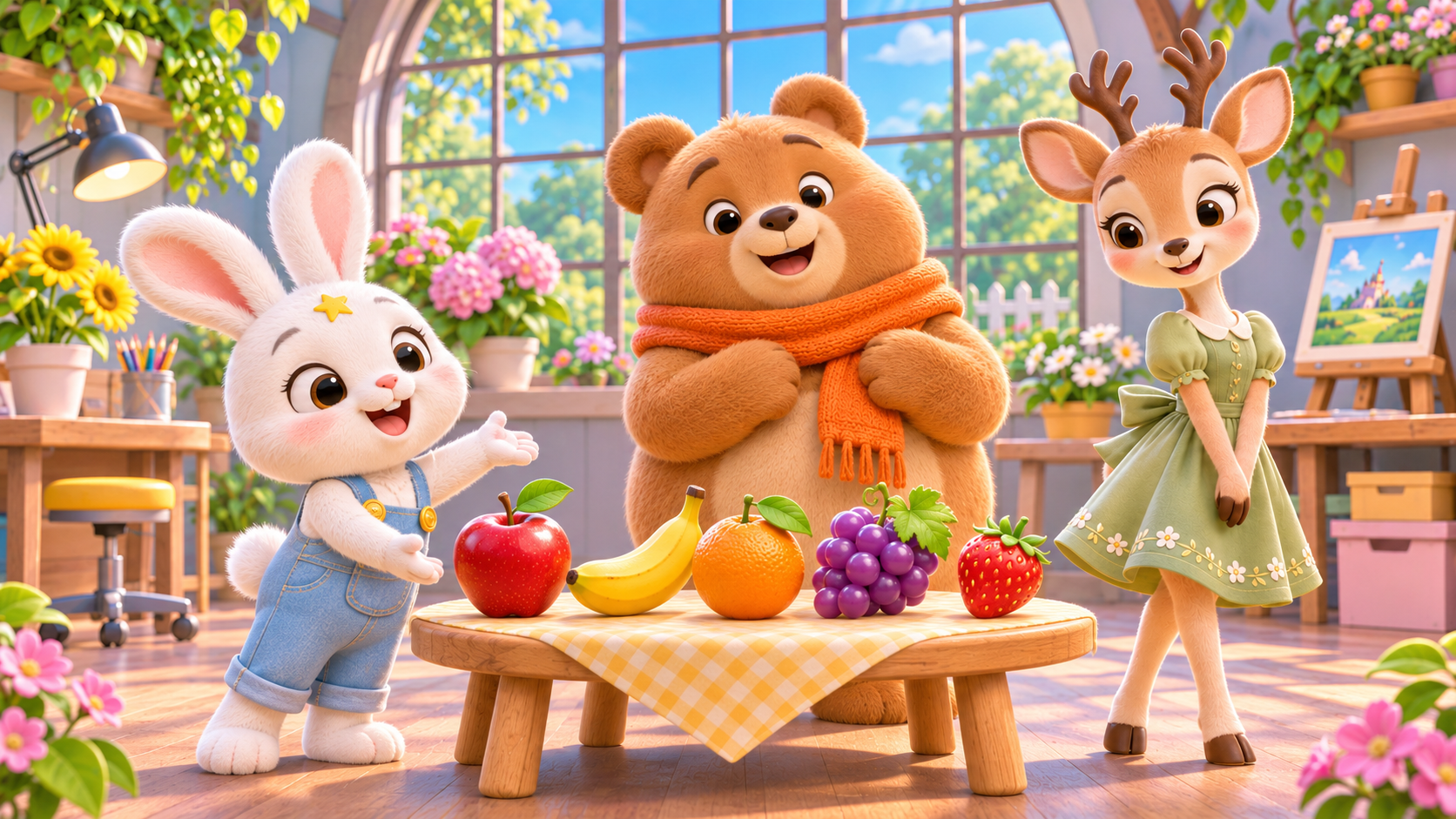
Figure: the first episode, "Star Bunny Teaches You Five Fruits" (generated illustration)
The theme itself does not matter — fruits can be swapped for numbers, colors, animals, or simple everyday English dialogues. What is really worth keeping is the workflow and character assets built before it.
5. Production Pitfalls: Four Real Problems and One Verification Rule
Problem 1: Too many steps. The first version had 50+ steps and was hard to manage. The fix was to ask the AI to merge repeated planning tasks and organize the top-level flow into five stages. But the author left an honest footnote: fewer steps does not necessarily mean fewer tokens — that still needs a comparison of real call records. He has not yet obtained a complete before-and-after token comparison, so he cannot directly claim the optimization saved cost.
Problem 2: Characters drift easily. The fix is to save character reference images and fixed settings, and reuse them in later videos. But this only lowers the chance of drift — it cannot guarantee full consistency. Cross-shot character stability is still on the author's own "room for improvement" list from the real run.
Problem 3: Dubbing and lip-sync can mismatch. Especially when video and dubbing are generated separately, the character's mouth may not match the lines. The workaround is to prefer narration, wide shots, and few frontal speaking shots, and to use a dedicated lip-sync tool when necessary.
Problem 4: An interface was generated, but no real video. This is the point the author stresses most. Do not just look at a task card showing "done" — check whether there is a real video file, an audio track, and a playable MP4.
⚠️ Gotcha Warning: The easiest thing to misread in this tutorial is mistaking "the prompt asked for the feature" for "the feature is implemented." The author states it plainly in the original post: the prompt states production requirements — it does not mean every feature is automatically implemented. If a beautiful control panel is generated but cannot actually export a video, it does not count as done. The only acceptance test is a playable MP4 file on disk, with matching audio and subtitles — the word "done" on a task card does not count.
In one real run, Muse took about 17 minutes to generate a children's English animation. The author's judgment is restrained: this shows that organizing AI video production into an automated workflow has real value, but cross-shot character stability, dubbing naturalness, lip-sync, and workflow efficiency all still have room to improve. As for cost, when asked, his answer was "does time count?" — how much money it cost was not expanded on; the time was 17 minutes per episode.
The comment section is worth noting too: someone said they had done a similar project with good results, and someone else pointed out the essence of this lane — the most brutal thing about AI children's animation is not the technology but the cost disruption of outsourcing: making a courseware set used to mean painful back-and-forth with illustrators, and now one person can run the whole pipeline alone. The author replied, "It's an old lane — I'm just doing it with AI now," and "Let's improve together, honestly."