1. The Core Bottleneck: Taming Fragmentation in Security Engineering
Security engineers, red teamers, and CTF players frequently find themselves trapped in a fragmented ecosystem, jumping between hundreds of distinct GitHub repositories. Reconnaissance, OSINT, exploitation, and post-exploitation workflows are scattered across mismatched language runtimes and dependency trees. Every engagement starts with the tedious ritual of hunting down scripts, fixing broken dependencies, and reconstructing long command-line arguments.
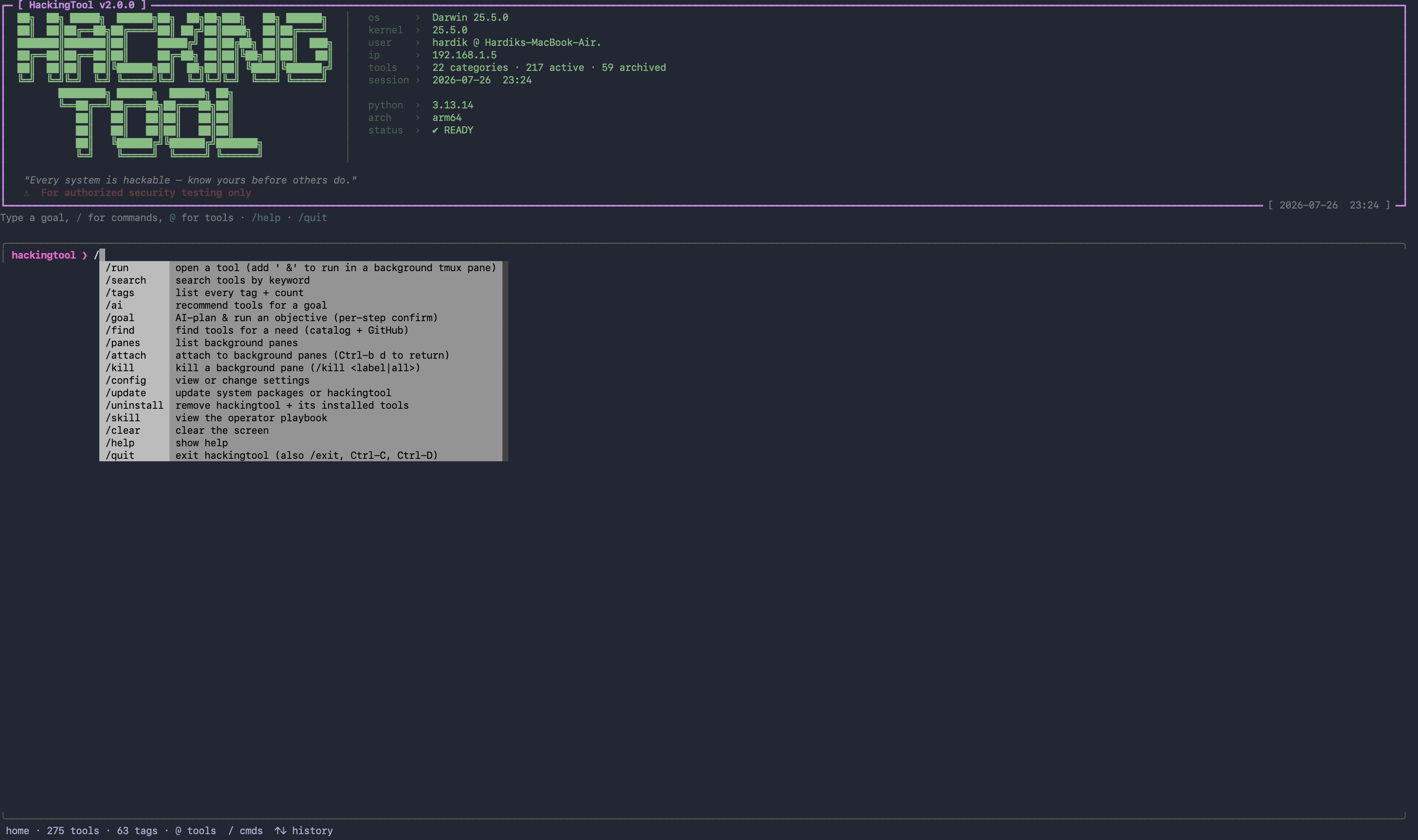
Z4nzu/hackingtool abandons the brute-force approach of raw script dumping, consolidating 215 vetted security utilities into a unified Python interactive console. Crucially, the project integrates an AI-driven intent recognition and translation layer. When an engineer inputs a natural language prompt such as "find subdomains of example.com," the system bypasses rigid keyword matching, maps the intent to the precise documented command, plans multi-step objectives, and drafts engagement reports. This design strips away the mechanical overhead of tool discovery, leaving developers to focus strictly on architectural validation and logic evaluation.
💡 Core Architecture Insight: By routing disparate CLI utilities through a unified meta-console and leveraging local or remote LLMs as semantic translation gateways, hackingtool compresses the tool-discovery cost down to zero.
2. Core Architecture & Data Flow Analysis
Under the hood, hackingtool functions as a strictly controlled engineering assistant rather than a black-box autonomous execution agent. The system consists of a CLI interaction layer, an AI recommendation router, a local metadata catalog, and a subprocess execution engine. No generated command executes automatically; every action requires explicit human confirmation to uphold the strict boundaries of authorized penetration testing.
[ User Input / Natural Language ] ---> [ CLI Command Parser ] ---> [ AI Intent Router ]
                                                                          │
                                                                          ▼
[ Verified Execution (list-form subprocess) ] <--- [ Local Catalog & Metadata ]
The metadata layer maintains exact indices for 21 categories and 215 tools, tracking installation paths, dependency constraints, and verified invocation syntaxes. When a user triggers the /find command, the system queries the local catalog first, falls back to the GitHub API if necessary, and ranks results by maintenance activity and relevance. During execution, the framework enforces list-form subprocess calls to completely eliminate shell injection vulnerabilities. Additionally, tmux background pane integration supports parallel monitoring for complex engagement scenarios.
3. Technology Selection & Hardcore Benchmarking
| Evaluation Dimension | This Solution (hackingtool) | Traditional Paradigm | Typical Competitor | Production Benefit |
|---|---|---|---|---|
| Tool Integration | Unified console for 215 tools | Fragmented scripts & repos | Massive VM images (Kali) | Eliminates environment drift |
| Dependency Management | Isolated via pipx |
Global system pollution | Hardcoded container images | Prevents Python package conflicts |
| Intent Resolution | Structured AI mapping layer | Manual command memorization | Rigid rule matching | Lowers learning & search overhead |
| Security & Compliance | No auto-exec, SHA-256 verified | Risky curl | bash patterns |
Proprietary commercial suites | Prevents supply chain poisoning |
This architecture exercises rigorous restraint. It does not attempt to rewrite the underlying logic of every security tool; instead, it acts as a tool router and context binder. By running inside isolated pipx environments, the project keeps host systems pristine while allowing conflicting dependencies to coexist peacefully. Compared to bloated security operating system images, this lightweight package management approach aligns naturally with modern cloud-native workflows.
4. Hands-on Engineering: Building a Minimal Closed Loop
On Linux or macOS environments, deploying via pipx is strongly recommended to isolate dependencies and protect the system-level Python installation.
# 1 —— Clone the official source repository
git clone https://github.com/Z4nzu/hackingtool.git
cd hackingtool

# 2 —— Install into an isolated virtual environment via pipx and expose the CLI binary
pipx install .

# 3 —— Launch the interactive hackingtool console from any directory
hackingtool
Once inside the console, press / to open the command palette. Natural language queries automatically resolve to verified execution directives:
# Pseudocode: How hackingtool translates user intent into safe subprocess execution
import subprocess

def execute_tool_safely(tool_command_list):
    # Arguments must be passed as a list, preventing shell injection vulnerabilities
    result = subprocess.run(
        tool_command_list,
        stdout=subprocess.PIPE,
        stderr=subprocess.PIPE,
        text=True,
        timeout=300
    )
    return result.stdout
The console streams live execution readouts and provides structured reporting capabilities upon task completion.
5. Production Gotchas & Operational Warnings
Deploying and operating aggregation toolkits in production environments requires mitigating specific engineering risks.
⚠️ Gotcha Warning: Platform Restrictions: Windows operating systems are not supported. The application checks the runtime environment upon initialization and exits immediately if running on Windows. Ensure deployment takes place on Linux (Kali, Debian, Ubuntu, Arch) or macOS.
⚠️ Gotcha Warning: API Latency and Cold Starts: When utilizing AI-driven recommendations and objective planning with remote LLM APIs, high-frequency context exchanges generate continuous token consumption. Configure local lightweight models (such as Llama 3 via Ollama) in air-gapped or internal networks to eliminate latency and data exfiltration risks.
Furthermore, upstream repositories marked as archived may occasionally feature broken endpoints or outdated dependencies. If execution errors occur, configure show_archived true via /config to inspect detailed states and prune stale local configurations.