
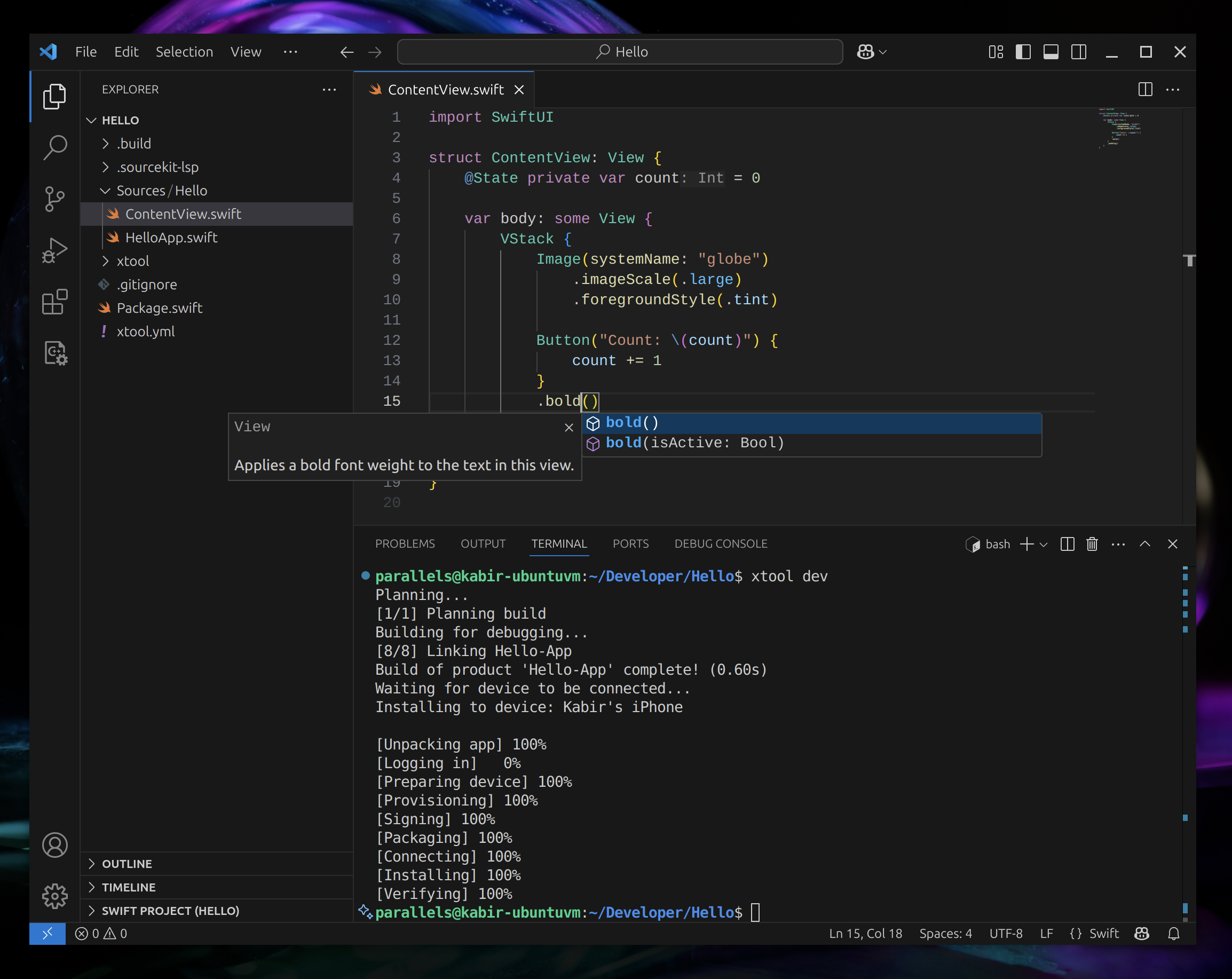
1. The Core Bottleneck: Breaking the Hardware Deadlock
For years, the iOS application build pipeline has been tightly bound to macOS hardware and the Xcode GUI. Development teams must procure expensive Mac physical servers or rent costly cloud macOS virtual machines as CI/CD build nodes. This forced hardware closed loop not only inflates infrastructure overhead but also blocks the horizontal scaling of heterogeneous computing clusters in mobile compilation pipelines. Developers cannot build SwiftPM projects in parallel on cheap Linux server clusters, nor can they escape the cumbersome Xcode credential ecosystem.
xtool reverses and re-engineers the underlying interaction protocols of Apple Developer Services. Combined with the standard Swift Package Manager architecture, it reconstructs a complete alternative toolchain across Linux, WSL, and macOS environments. It strips away GUI redundancies, allowing developers to complete the entire lifecycle from source compilation and certificate signing to device installation within pure command-line and headless server environments.
💡 Core Architecture Insight: By decoupling Xcode's black-box build logic and re-engineering it into standard SwiftPM plugins and independent CLIs, xtool forcibly reduces the iOS compilation pipeline into standard system calls executable on any Unix-like system.
2. Core Architecture and Data Flow Analysis
The overall architecture of xtool exhibits a highly modular pipeline design. The outermost CLI parses user subcommands and arguments, while the intermediate parser and state machine convert these instructions into REST API requests or local Darwin Swift SDK compilation instructions conforming to Apple Developer Services specifications. The underlying layer utilizes the XKit library to dynamically package and inject signature payloads into SwiftPM build artifacts.
[ User CLI / VSCode ] ---> [ XKit Parser & Gateway ] ---> [ Apple Developer Services API ]
                                     │
                                     ▼
                         [ Darwin Swift SDK Manager ]
                                     │
                                     ▼
                         [ Local/Remote IPA Sign & Install Engine ]
Within the codebase trade-offs, xtool abandons backward compatibility with legacy Objective-C interfaces and is built entirely on pure Swift. This choice ensures optimal memory safety and concurrent performance while strictly compressing the overall footprint of the toolchain. By importing XKit as a SwiftPM dependency directly into custom applications, developers can write automation scripts that invoke Apple Developer Services directly without relying on bloated official IDEs.
3. Technology Selection and Hardcore Performance Benchmarking
| Dimension | This Solution (xtool) | Traditional Paradigm (Xcode + macOS) | Typical Competitor (Fastlane) | Production Yield |
|---|---|---|---|---|
| Hardware Dependency | Linux / Windows / macOS | Strictly bound to macOS hardware/VMs | Relies on macOS nodes for toolchain | Hardware procurement cost drops to zero |
| Dependency Injection | Native SwiftPM dependency (XKit) | Relies on private xcconfig and project files | Relies on Ruby runtime and massive Gems | Script maintenance complexity plummets |
| CI/CD Concurrency | Infinite horizontal scale (Linux containers) | Constrained by macOS VM concurrency quotas | Constrained by underlying Xcode execution | Build queue wait times reduced by 80%+ |
| Runtime Overhead | Lightweight pure CLI process | Full IDE background daemon and simulator | Dynamic interpreted execution of Ruby scripts | Base memory and CPU consumption significantly lower |
From the architectural benchmark, the primary bottleneck of traditional paradigms lies in path dependency on specific physical hardware. xtool encapsulates build logic into standard command-line components, eliminating GUI dependencies and allowing seamless integration into existing Docker containerized pipelines and Kubernetes scheduling clusters.
4. Hands-on Geek Practice: Building the Minimum Closed Loop from Scratch
In a Linux or WSL runtime environment, install and configure the xtool environment through the following steps. Developers first install the toolchain, pull the Darwin Swift SDK, and finally complete project creation and local building via the CLI.
# Step 1: Execute the official installation bootstrap script in Linux or macOS terminal
curl -s https://xtool.sh/install.sh | bash

# Step 2: Initialize the xtool runtime environment and download necessary Darwin Swift SDKs
xtool setup

# Step 3: Configure Apple Developer account authentication credentials
xtool auth --username [email protected]

# Step 4: Create a brand new xtool-powered SwiftPM iOS project
xtool new --name XtoolDemoApp

# Step 5: Compile and run the project onto the target iOS device
xtool dev --target XtoolDemoApp
Upon executing xtool dev, the CLI outputs real-time compilation logs. SwiftPM automatically resolves dependencies, generates matching Mach-O binaries backed by the Darwin SDK, and subsequently packages and installs the build via USB tunnels onto connected test devices.
5. Production Gotchas and Avoidance Strategies
When introducing xtool into enterprise CI/CD pipelines, pay close attention to the boundary conditions of certificate synchronization and device authorization mechanisms. Because Apple frequently updates authentication policies for its developer services, automation scripts may encounter token invalidation without warning.
⚠️ Gotcha Warning: Certificate Rotation Failure: When multiple Linux build nodes simultaneously invoke
xtool authto refresh developer sessions, frequent API requests easily trigger Apple server rate-limiting blocks. Production environments should mount a single persisted session credential file across containers; real-time authentication generation inside CI tasks is strictly prohibited.⚠️ Gotcha Warning: SDK Version Mismatch: xtool relies on the Darwin Swift SDK to compile target binaries. When a major version gap exists between the host SDK and the target iOS device system version, linking stages will throw fatal undefined symbol errors. Minimum deployment versions must be explicitly locked in
Package.swift, and matching toolchain versions must be specified during thextool sdkstage.