
1. The Core Bottleneck: What Engineering Wall Does It Break?
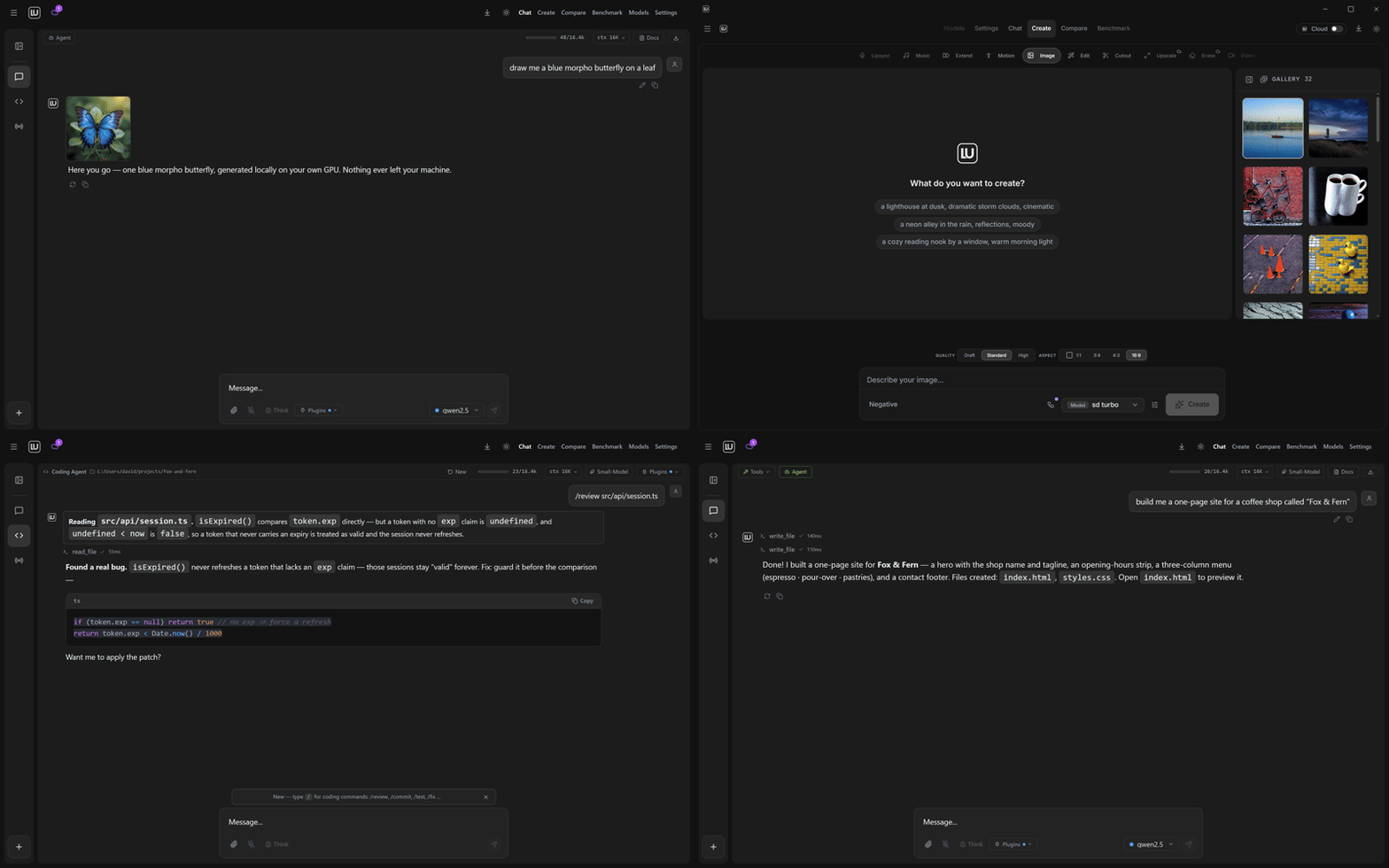
Local AI developers have long suffered in fragmented toolchain hell. Running text models requires Ollama or LM Studio, while processing image and video generation forces manual configuration of ComfyUI, downloading checkpoints, matching PyTorch versions, and debugging CUDA conflicts. This fragile dependency graph leads to high environment failure rates. locally-uncensored strips away unnecessary middle layers, embedding model management, inference engine drivers, and multimodal pipelines into a single Electron desktop application to bridge the configuration gap.
💡 Core Architecture Insight: By directly hosting underlying inference engines and cross-process communication inside a desktop client, it compresses a distributed AI stack into a single distributable binary.
2. Core Architecture and Data Flow Analysis
The project adopts an Electron architecture separating the main process from rendering processes, dynamically invoking local inference runtimes. When a user triggers a multimodal generation task from the chat interface, the frontend state machine parses the prompt, routes text workloads to the local LLM engine, and sends image or video tasks to the embedded ComfyUI instance. A centralized context routing table ensures chat history, LoRA weight paths, and agent execution plans synchronize seamlessly across tabs.
[ Desktop UI / Tabs ] ---> [ IPC Router / Main Process ] ---> [ Memory & Context Manager ]
                                        │
         ┌──────────────────────────────┴──────────────────────────────┐
         ▼                                                             ▼
[ Local LLM Engine (Ollama/LM Studio) ]               [ ComfyUI Embedded Backend ]
         │                                                             │
         ▼                                                             ▼
   [ Text Generation ]                                        [ Image / Video Generation ]
In coding agent mode, the system introduces a modification review mechanism. The agent generates a diff view before modifying any files, allowing developers to review changes line by line, preventing autonomous agent runaway from corrupting local codebases.
3. Technical Selection and Hardcore Benchmarking
| Dimension | locally-uncensored | Traditional Setup (ComfyUI + Ollama) | Cloud Proprietary Solutions | Production Benefits |
|---|---|---|---|---|
| Deployment Complexity | Zero-config, one-click installer | Manual Python virtualenvs & dependencies | Requires stable internet & API keys | Saves 90%+ initial setup time |
| Hardware Reuse | Links existing model files, zero duplication | Isolated storage per tool | Data processed entirely in the cloud | Saves hundreds of GBs of disk space |
| Privacy & Security | 100% offline, zero data leakage | Offline, but requires manual wiring | Compliance risks with sensitive code | Meets strict enterprise data compliance |
| Multimodal Synergy | Chat, generation, coding in one window | Multiple fragmented WebUIs | Limited multimodality, high pay-per-use | Enhances full-stack development efficiency |
| Extensibility | Open source, standard API & LoRA support | High modularity, extreme debugging cost | Closed box, zero architectural customization | Grants complete system control to geeks |
This architecture refuses to push tedious configuration onto developers. By taking over runtime environments and hardcoding path mappings, it maximizes consumer GPU throughput while maintaining strict data privacy.
4. Minimal Production Demo & CLI Workflow
Developers can download prebuilt binaries from GitHub Releases or build from source. Below is the command-line workflow to spin up the local development environment on Linux or macOS:
# Clone the official repository to your local workspace
git clone https://github.com/PurpleDoubleD/locally-uncensored.git

# Navigate into the project root directorycd locally-uncensored

# Install frontend and main process dependencies
npm install

# Launch the browser development mode with live reloading
npm run dev
During the initial startup wizard, the application automatically scans for running Ollama or LM Studio instances. If no engine is detected, clicking one-click install sets up the runtime automatically, allowing immediate model loading and generation tasks.
5. Production Gotchas and Pitfalls
When deploying and running locally, heavy heterogeneous hardware calls can trigger edge-case exceptions.
⚠️ Gotcha Warning [Antivirus False Positives]: Windows NSIS installers lacking expensive commercial digital signatures may be flagged by antivirus software. This is a common false positive triggered by public CI builds; verify integrity using the official minisign public key.
⚠️ Gotcha Warning [VRAM Exhaustion & Multi-Image Input]: Continuously feeding high-resolution images into chat or coding agents without limiting context windows or concurrent task counts can exhaust local GPU VRAM. Configure session context limits and maintain single-task queues for heavy video generation workloads.