
1. The Core Bottleneck: What Engineering Deadlock Did It Break?
The primary bottleneck for enterprise AI agents is not the code-generation capacity of large language models, but the semantic ambiguity of underlying data. Traditional workflows dump entire database schemas directly into model prompt windows. As table counts explode, context windows fill with redundant fields, token bills spiral out of control, and model guesses on identically named columns trigger catastrophic query errors. Miscalculated revenue figures and flawed table joins render analytics pipelines useless in production.
Auto-Ontology takes a pragmatic architectural detour. Instead of modifying models, it deploys a dedicated context service right next to your databases. This service ingests metadata, compiles it into a structured semantic graph, maps business terms to physical columns, and anchors verified SQL metrics and table relationships. When an agent queries, it receives only relevant terms and tables, cutting off the hallucination chain at its root.
💡 Core Architectural Insight: Converting dynamic schema guesswork into deterministic semantic graph matching via an independent context layer, forcing AI agents to execute queries within constrained business meshes instead of probabilistic extrapolation.
2. Core Architecture and Data Flow Analysis
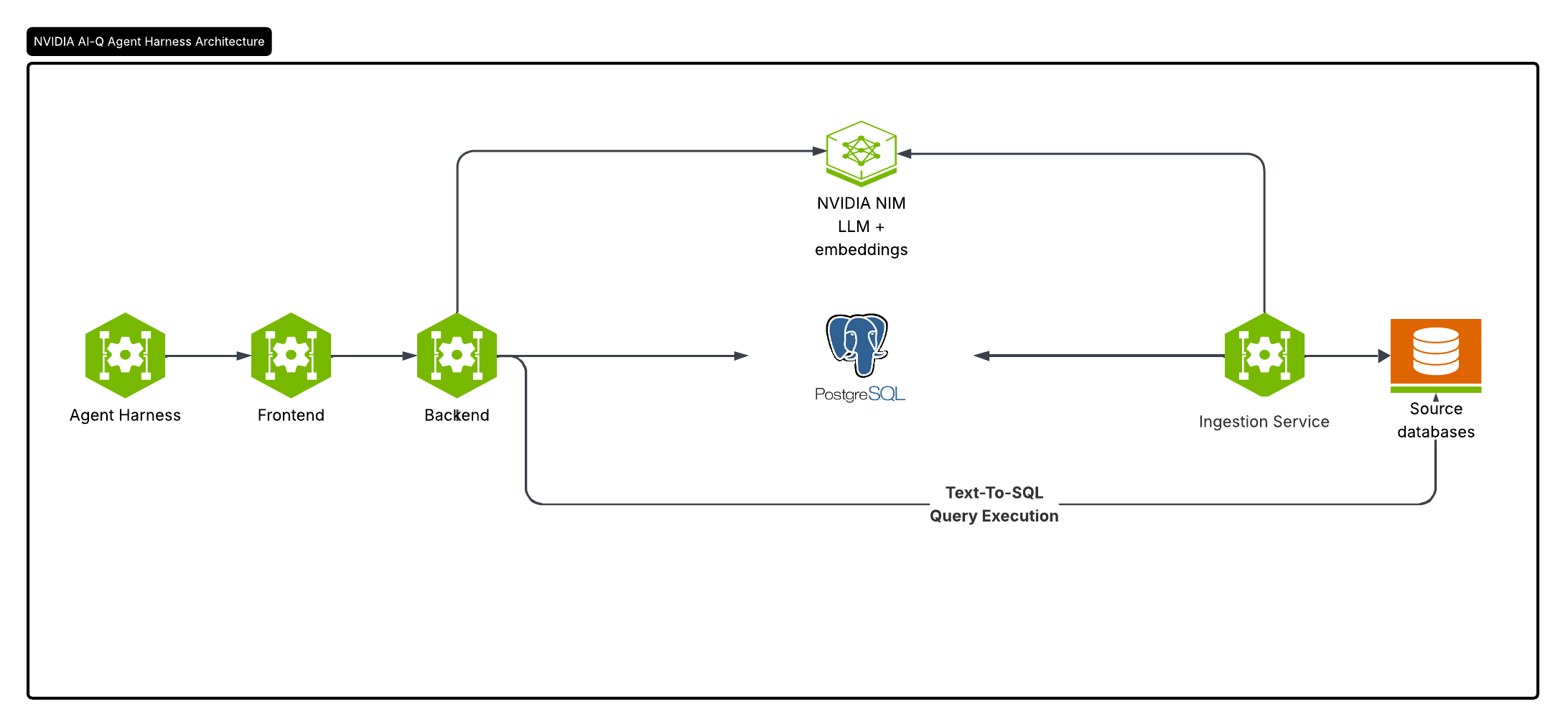
The architecture combines a metadata importer, semantic compiler, web review UI, and MCP-compatible agent interfaces. At startup, the parser ingests raw schemas, translating them into ontology objects containing business concepts, measures, and join paths via LLM assistance and rule engines. Developers review and certify these mappings in the web UI.
Data flow follows strict single-responsibility boundaries. When a client submits a natural language query, the gateway parses intent, resolves graph entities and join paths, and dynamically assembles a minimized context set and executable SQL for the execution engine.
[ Client / Agent ] ---> [ Gateway / Intent Parser ] ---> [ Ontology Semantic Graph ]
                                                                  │
                                                                  ▼
[ Verified SQL Output ] <--- [ Execution Engine & Verifier ] <--- [ Minimized Context ]
Engineering trade-offs favor non-invasive deployment. It runs as a sidecar service without replacing existing data warehouses, integrating with current semantic models while exposing deterministic context to any Model Context Protocol agent harness.
3. Hardcore Technical Evaluation & Benchmark Comparison
| Evaluation Dimension | This Project (auto-ontology) | Traditional Implementation | Typical Competitor | Production Gains |
|---|---|---|---|---|
| Context Management | On-demand graph term loading | Full schema dump in prompt | Static doc embedding retrieval | Zero token waste & confusion |
| Semantic Accuracy | Business terms bound to SQL | Runtime LLM guessing | Hardcoded ORM mappings | Eliminates confident wrong queries |
| Validation & Checks | Pre-execution answerability check | Direct execution without checks | Unit test suites only | Asks clarifying questions proactively |
| Architectural Intrusion | Sidecar service, zero core changes | App-level query assembly | Full data warehouse rewrite | Low cost, zero-risk rollout |
| Ecosystem Integration | Native MCP & REST support | Custom private API wrappers | Tied to specific commercial DBs | Instant integration with AI stacks |
Benchmarked against traditional prompt-stuffing, Auto-Ontology replaces probabilistic risks with deterministic graph constraints, keeping agent behavior inside audited boundaries.
4. Minimal Production Loop: Step-by-Step Geek Practical Guide
Deploy Auto-Ontology locally against Wide World Importers, Microsoft's sample database. Ensure Docker Compose v2 and astral.sh/uv are installed.
Clone the repo and configure environment variables:
git clone https://github.com/NVIDIA/auto-ontology.git && cd auto-ontology
cp .env.example .env
Populate .env with your NVIDIA API key and secure passwords:
DEFAULT_MODELS_API_KEY=nvapi-your-api-key-here
AUTH_SECRET=a_long_random_string_from_openssl_rand
APP_URL=http://localhost:3000
POSTGRES_PASSWORD=secure_postgres_password_123
CONNECTION_STRINGS=postgresql://postgres:secure_postgres_password_123@postgres:5432/wideworldimporters
AUTO_ONTOLOGY_ADMIN_PASSWORD=admin_password_123
PGADMIN_PASSWORD=pgadmin_password_123
Start PostgreSQL and run the data seeding script:
docker compose up -d --wait postgres

git clone https://github.com/NVIDIA/auto-ontology-eval.git ../auto-ontology-eval
(cd ../auto-ontology-eval && uv sync && cp .env.example .env && \
  POSTGRES_PASSWORD='secure_postgres_password_123' \
  uv run python scripts/seed/seed_wwi.py --database-name wideworldimporters --drop)
Build and boot up the full container stack:
docker compose up -d --build
Open http://localhost:3000, log in with admin credentials, navigate to Settings -> Semantic Compilation, and enable it. Once compilation finishes, navigate to Chat to execute natural language queries.
5. Production Gotchas and Pitfalls
Deploying this in enterprise production requires caution regarding hidden operational traps. Automated metadata ingestion relies on LLM interpretation of column names. Legacy databases with unstandardized naming conventions will generate dirty initial mappings that demand manual review in the UI before exposing graphs to live agents.
⚠️ Gotcha Warning [API Key Fallback Conflict]: The
.env.examplefile defines both a global default key and role-specific keys. Deleting the global key without fully populating role-specific keys causes sub-agent initialization failures. KeepDEFAULT_MODELS_API_KEYconfigured in production environments.⚠️ Gotcha Warning [LLM Throughput & Timeouts]: Large schemas trigger massive parallel LLM calls during initial semantic compilation. Strict enterprise API gateway rate limits or short connection timeouts will interrupt compilation. Adjust reverse proxy and client timeout thresholds to ensure successful initial graph convergence.