
1. The Core Bottleneck: What Engineering Dead Ends Does It Pierce?
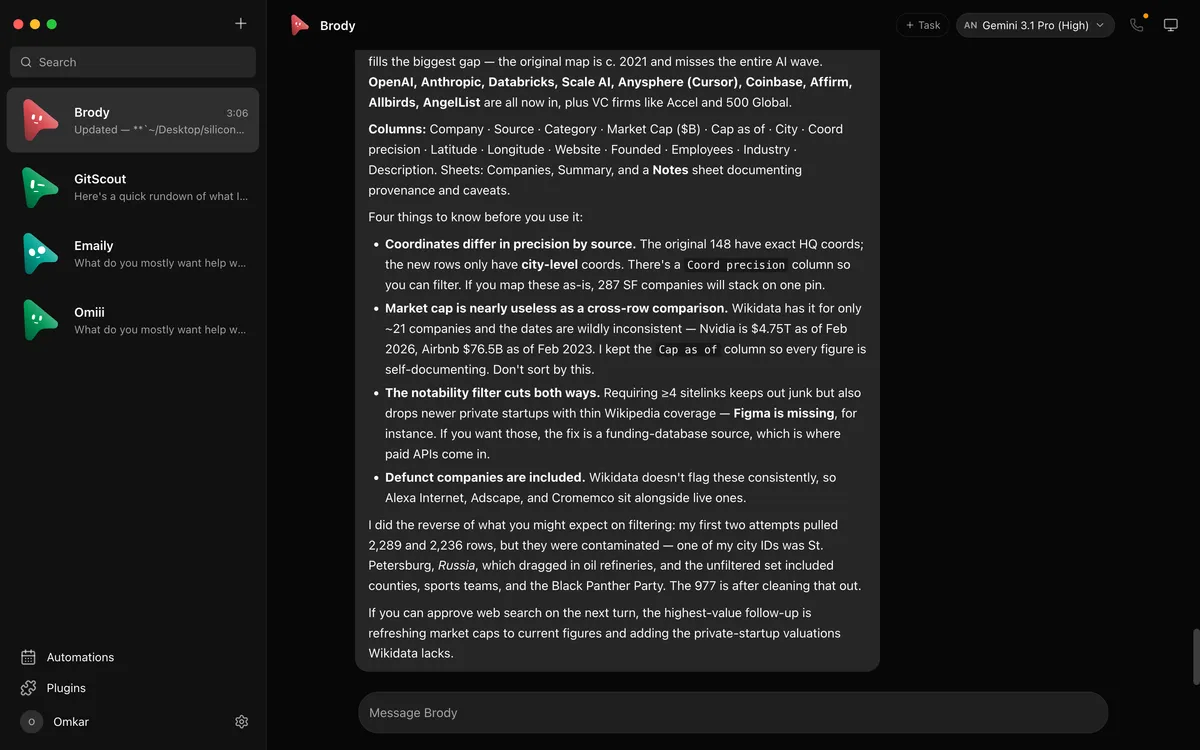
Mainstream personal AI agent products lock user data, runtime models, and execution sandboxes inside closed cloud provider data centers. Developers cannot control the underlying binary versions and are forced to pay hefty markups for intermediary proxy APIs. OpenMausBot completely shatters this monolithic design by mapping interactions directly into a familiar messaging app interface, where every sidebar bot functions as an independent local agent process. A lightweight harness server runs locally on 127.0.0.1, directly orchestrating official command-line tools installed on the host machine, thereby returning full control and data sovereignty to the developer.
💡 Architectural Core Insight: By directly binding the chat interface to local CLI processes, this architecture eliminates cloud proxy authentication taxes and implements high-freedom multi-agent workflows using a messaging app metaphor.
2. Core Architecture and Data Flow Analysis
OpenMausBot utilizes a highly decoupled client-harness architecture. The Electron-based desktop client renders the Telegram-style chat interface, while the background service running on 127.0.0.1 acts as the master controller for agent lifecycles. When a user issues a command, the dynamic parser routes the message to the corresponding CLI runtime while persisting memory states directly to the local file system.
[ Electron UI ] ---> [ Local Harness Server (127.0.0.1) ] ---> [ Memory Layer (~/.openmausbot) ]
                                     │
                                     ▼
                        [ CLI Runtime (Claude/Codex/Grok) ]
                                     │
                                     ▼
                    [ Execution Sandbox (Cloud Linux / Local VM) ]
Within the underlying execution flow, each agent instance maintains isolated context threads and tool permission sets. When an agent attempts to execute high-risk shell commands or file edits, the built-in permission broker transforms operations into inline approval cards, enforcing human-in-the-loop validation. This design maintains automation velocity while establishing strict security boundaries.
3. Technology Selection and Hardcore Performance Benchmark
| Selection Dimension | This Solution (OpenMausBot) | Traditional Paradigm (Closed Cloud Agents) | Typical Competitor (Monolithic API Wrappers) | Production Yields |
|---|---|---|---|---|
| Data Storage | Local ~/.openmausbot directory |
Cloud distributed databases | Third-party SaaS caches | Complete data sovereignty and privacy compliance |
| Model Binding | Direct local claude/codex CLI calls |
Fixed single-vendor cloud models | Dependent on third-party aggregator API gateways | Reuse existing official subscriptions with zero intermediary markup |
| Environment Isolation | Dynamic cloud desktops & isolated local VMs | Fixed cloud sandbox containers | No native secure isolation sandbox | Balances local hardware compute with cloud safety boundaries |
| Permission Control | Inline card approvals (Allow/Deny) | Server-side implicit automatic execution | Uninteractive coarse-grained token limits | Eliminates unauthorized system damage |
Compared to traditional paradigms, OpenMausBot eliminates middleman taxes and ensures local-first determinism. Developers avoid extra markups on aggregated APIs and eliminate concerns regarding conversation history being used for cloud model training.
4. Hands-on Geek Guide: Building the Minimum Viable Loop
Launch the local harness service using precompiled binaries or source builds. The following steps demonstrate source cloning and dependency installation.
# Clone the official repository to the local working directory
git clone https://github.com/milind-soni/OpenMausBot.git

# Enter the project root directory
cd OpenMausBot

# Install frontend and harness service dependencies
npm install

# Start the local development server and harness daemon
npm run dev
Executing these commands starts the agent orchestration service on local 127.0.0.1, automatically connecting the desktop client to the local harness port. After configuring the installed CLI executable paths in the settings interface, you can create and interact directly with local agents from the sidebar.
5. Production Deployment Gotchas and Pitfall Avoidance
Introducing this architecture into production environments or high-intensity daily development workflows requires strict attention to underlying operating system permission differences and concurrent process resource consumption.
⚠️ Gotcha Warning [Wayland Host Control Limitations]: Under Ubuntu Wayland desktop environments, default security protocols block underlying screen capture and peripheral takeover. To enable full host control capabilities, switch to an Xorg session or run on macOS and Ubuntu 24.04 Xorg environments.
⚠️ Gotcha Warning [CLI Path Configuration Failures]: When system environment variables or Node paths change, the harness service may fail to correctly locate local
claudeorcodexexecutable binaries. Explicitly define absolute paths inSettings -> Enginesto prevent agent cold-start failures caused by missing PATH variables.