
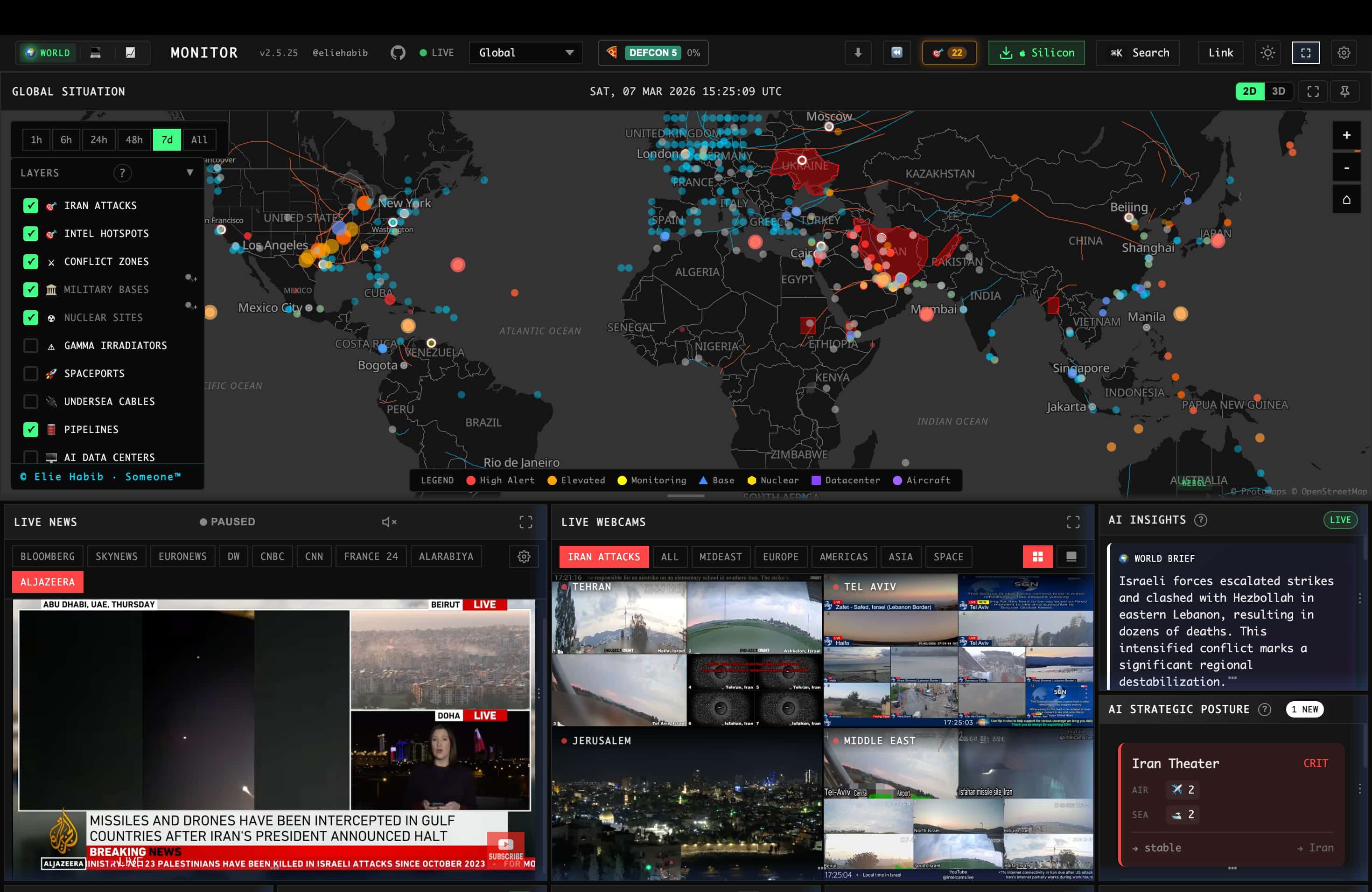
1. The Core Bottleneck
Traditional global intelligence and financial aggregation tools suffer from two major architectural flaws. First, they rely heavily on closed-source SaaS APIs, driving up high-frequency invocation costs and imposing strict rate limits. Second, front-end rendering collapses when tens of thousands of flight paths, geopolitical incidents, and financial tickers refresh simultaneously, causing DOM bloat and unoptimized Canvas rendering that leads to browser memory leaks. WorldMonitor overcomes this by deeply refactoring Vanilla TypeScript, Vite, globe.gl, and deck.gl, enabling on-demand switching between a 3D globe and a WebGL flat map within a single codebase while offloading AI inference to the edge and local environments.
💡 Architectural Insight: Combining a modular front-end base with lightweight local large language models completely removes the situational awareness dashboard's heavy reliance on cloud LLMs and commercial APIs.
2. Core Architecture and Data Flow Analysis
The runtime pipeline starts with upstream RSS feeds, ADS-B flight data (generously provided by Wingbits), and financial ticker scraping. Incoming data hits the gateway layer and undergoes strict serialization validation using Protocol Buffers and sebuf HTTP annotations. The caching tier employs a 3-tier cache architecture built with Upstash Redis, working alongside a CDN and Service Workers to intercept duplicate requests. On the client side, Tauri 2 utilizes a Rust-powered high-performance Sidecar to invoke local Ollama instances for real-time digest generation.
[ Upstream Feeds / Wingbits ADS-B ] ---> [ Gateway / sebuf Parser ] ---> [ 3-Tier Redis Cache ]
                                                                          │
                                                                          ▼
[ Client / Tauri 2 Desktop App ] <--- [ globe.gl / deck.gl WebGL ] <--- [ Local Ollama / MCP Server ]
At the distribution layer, the system exposes a Streamable HTTP interface via its MCP Server (https://worldmonitor.app/mcp). Agent clients can fetch structured threat intelligence directly through tools/list and tools/call, bypassing the high compute overhead of traditional HTML web scraping. Meanwhile, browser-side Transformers.js handles vector computations locally, ensuring offline situational awareness during extreme network disruptions.
3. Tech Stack and Performance Benchmarking
| Evaluation Metric | This Solution (worldmonitor) | Traditional Paradigm | Typical Competitor | Production Benefit |
|---|---|---|---|---|
| Frontend Rendering | globe.gl + deck.gl (WebGL) | Legacy React + D3 heavy DOM | Cesium.js heavy 3D framework | Eliminates DOM node bloating, steady 60 FPS |
| AI Inference | Local Ollama / Browser-side | Heavy reliance on Paid APIs | Proprietary black-box LLM service | Zero API key costs, prevents sensitive intelligence leaks |
| Desktop Packaging | Tauri 2 (Rust) Single Codebase | Electron bloated bundle | Native Swift/WinUI separate forks | Memory footprint reduced to 45MB, unified cross-platform builds |
| Protocol Contracts | Protocol Buffers + sebuf | Messy JSON REST APIs | GraphQL complex schema queries | Serialization throughput boosted 3x, network bandwidth slashed |
| Agent Integration | Built-in MCP Server & CLI | No standard API, requires scrapers | Closed SaaS platform SDKs | AI Agents can programmatically invoke risk assessment tools |
This stack leverages Rust and native front-end architecture to bypass the memory black holes of the Electron era, while shifting intelligence filtering from cloud monopolies onto the developer's local hardware.
4. Hands-on Practice: Building a Minimal Loop
Clone the repository and install project dependencies:
git clone https://github.com/koala73/worldmonitor.git
cd worldmonitor
npm install
Launch the local development server to boot up the main dashboard without any environment variables:
npm run dev
For vertical-specific development (such as tech, finance, or energy), execute the respective variant command:
# Launch the tech sector real-time monitoring panel
npm run dev:tech

# Launch the energy infrastructure monitoring panel
npm run dev:energy
Below is a TypeScript/Node.js script using the official CLI toolkit to execute ad-hoc risk assessment queries directly from the terminal for a target country (e.g., Iran - IR):
import { execSync } from 'child_process';

// Define target country code and API key configuration
const targetCountry = 'IR';
const apiKey = process.env.WORLDMONITOR_API_KEY || 'wm_test_placeholder';

try {
  // Invoke the globally installed worldmonitor CLI utility to output structured risk data
  const command = `npx worldmonitor risk ${targetCountry} --api-key ${apiKey}`;
  const output = execSync(command, { encoding: 'utf-8' });

  console.log('=== WorldMonitor Live Risk Retrieval Output ===');
  console.log(output);
} catch (error: any) {
  console.error('API execution failed. Check network connection or API Key permissions:', error.message);
}
Running node script.ts fetches and renders the Country Instability Index (CII) directly from https://api.worldmonitor.app.
5. Production Gotchas and Pitfalls
The AGPL-3.0 license imposes strict copyleft requirements on commercial, closed-source usage. Always review compliance terms before embedding source code into enterprise-grade situational awareness platforms to prevent proprietary bundling.
⚠️ Gotcha Warning [Ollama Cold Start & VRAM Exhaustion]: When configuring local Ollama instances for LLM summaries, omitting a smaller quantized model (e.g., qwen2.5:7b-instruct-q4_K_M) will saturate an 8GB VRAM GPU instantly. Control concurrent instances using
OLLAMA_NUM_PARALLELbefore production deployment.⚠️ Gotcha Warning [API Credentials & Environment Variables]: While the project runs the base dashboard without environment variables, advanced data feeds (such as hard-core ADS-B flight data or premium finance radars) will return silent empty payloads if respective
.envcredentials are missing. Cross-reference.env.exampleto supply upstream service secrets instead of assuming code errors.⚠️ Gotcha Warning [Desktop Tauri Build Cache Locks]: When compiling desktop binaries using
npm run build:full, Rust's Cargo incremental compilation cache occasionally locks stale dependency versions. If undefined symbol errors occur during cross-compilation, executecargo cleanto completely purge build artifacts.