
1. The Core Bottleneck: What Engineering Pain Point Does It Break?
Terminal multiplexers have long been trapped in the era of pure text stream slicing and forwarding. When developers spin up autonomous coding agents like Claude Code or Aider across multiple panes, traditional tools like tmux or Zellij remain entirely blind to the actual execution states of these backend processes. The terminal reduces to an isolated character black box, forcing developers to constantly switch panes to verify whether an agent is stuck in an infinite loop, waiting for user confirmation, or has successfully committed code.
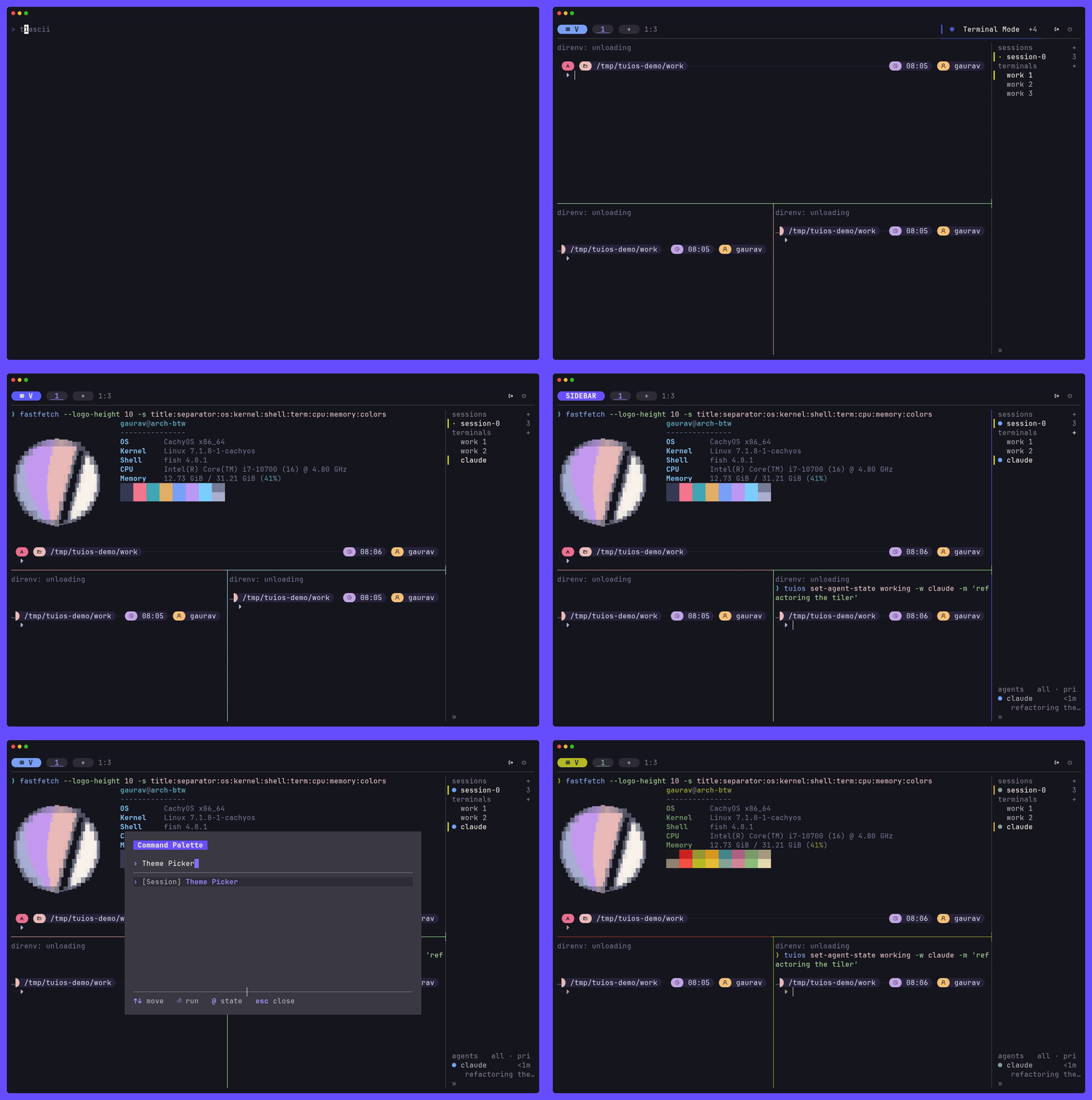
TUIOS shatters this opaque interaction model. The project tightly couples the terminal window manager with agent runtime states, maintaining session persistence via a background daemon while delivering a Vim-inspired modal interface powered by the Charm stack (Bubble Tea v2 and Lipgloss v2). It allows the terminal to truly understand the AI processes running within it, eliminating the context gap during agent collaboration.
💡 Core Architectural Insight: By refactoring the terminal multiplexer into a state machine that perceives AI agent lifecycles, TUIOS elevates fragmented terminal panes into a distributed array of autonomous, communicative agent nodes.
2. Core Architecture & Data Flow Analysis
Built entirely in Go, TUIOS discards traditional polling rendering models in favor of an event-driven architecture. The system consists of three primary components: the terminal client, the state daemon, and the cross-machine control protocol. The frontend rendering engine utilizes Lipgloss v2 for high-performance style computation, leveraging the Kitty graphics protocol for flicker-free image passthrough.
[ Terminal Client ] ---> [ IPC / Unix Socket ] ---> [ Daemon Engine ]
         │                                                   │
         ▼                                                   ▼
[ Bubble Tea v2 UI ] <---> [ Agent State Store ] <---> [ MCP / Subprocess ]
Keyboard and mouse inputs pass through non-blocking event channels from the client to the daemon. The daemon not only manages the PTY process tree but also tracks coding agent states running inside panes via a dedicated Agent State module. When an agent triggers an approval request or an internal message delivery, events are instantly written to the in-memory state store and broadcasted to all connected terminals or remote machines via JSON verb protocols, enabling cross-machine agent fleet coordination and inbox management.
3. Technology Selection & Hardcore Performance Benchmarking
| Evaluation Metric | This Solution (tuios) | Traditional Paradigm (tmux) | Modern Alternative (Zellij) | Production Yield |
|---|---|---|---|---|
| Core Language | Go (Charm Stack) | C (POSIX API) | Rust | Memory safe with high concurrency scheduling |
| Rendering Model | Event-driven (Near-zero idle CPU) | Timed redraw & full-screen refresh | Layout-tree local redraw | Drastically reduces laptop energy consumption during long idle states |
| Agent Awareness | Native integration (Inbox/State/MCP) | Zero awareness (Character black box) | Basic pane management only | Eliminates cognitive overhead of manually checking agent statuses |
| Graphics Support | Modern Kitty graphics protocol | Relies on external Sixel patches | Limited image rendering capability | Safely review UI renderings and design drafts directly inside the terminal |
| Session Persistence | Built-in cross-machine daemon | Depends on tmux server process | Depends on active client connection | Ensures distributed coding tasks survive network drops |
The dividing line in technical selection lies in adaptability to modern engineering workflows. The C-based tmux struggles to scale complex interactive logic, while the Rust-based Zellij lacks deep modeling for AI agent states. TUIOS harnesses the dominant Charm framework within the Go ecosystem to inject state-driven capabilities directly into the terminal interaction layer.
4. Hands-on Geek Guide: Building the Minimal Closed Loop
For production environments on macOS or Linux, installing stable binaries via Homebrew or building from source is recommended. The following steps demonstrate how to initialize and configure TUIOS for multi-agent workflows in an isolated environment.
# Install the stable release via Homebrew
brew install tuios

# Or build from source (requires Go 1.26.6 or newer)
go install github.com/Gaurav-Gosain/tuios/cmd/tuios@latest

# Start the daemon and enter the default master session interface
tuios

# Verify daemon status and inspect the active pane topology
tuios --list
Upon execution, the terminal switches to the Vim-inspired modal window manager interface. Developers can press <Ctrl>+<P> to invoke the fuzzy-search command palette or monitor active coding agent states and Git repository changes directly inside the Session Rail sidebar on the right.
5. Production Gotchas & Pitfalls to Avoid
When integrating TUIOS into rigorous engineering pipelines, watch out for these implementation boundaries regarding performance and compatibility:
⚠️ Gotcha Warning: True Color & Graphics Protocol Compatibility: Symptom: Running inside legacy terminal emulators or SSH environments lacking True Color support results in color degradation or rendering corruption for Kitty graphics and Lipgloss v2 gradients. Solution: Always pair TUIOS with Ghostty, Kitty, or WezTerm in production, and explicitly declare color environment variables in
tuios.json.⚠️ Gotcha Warning: Orphaned Daemons & Memory Bloat: Symptom: Spawning a massive fleet of long-running AI agent subprocesses without properly configuring lifecycle hooks can cause IPC buffer congestion and persistent memory growth in the daemon. Solution: Enable automated lifecycle management hooks in the TUIOS configuration file to forcefully reclaim PTY descriptors when agents terminate.