
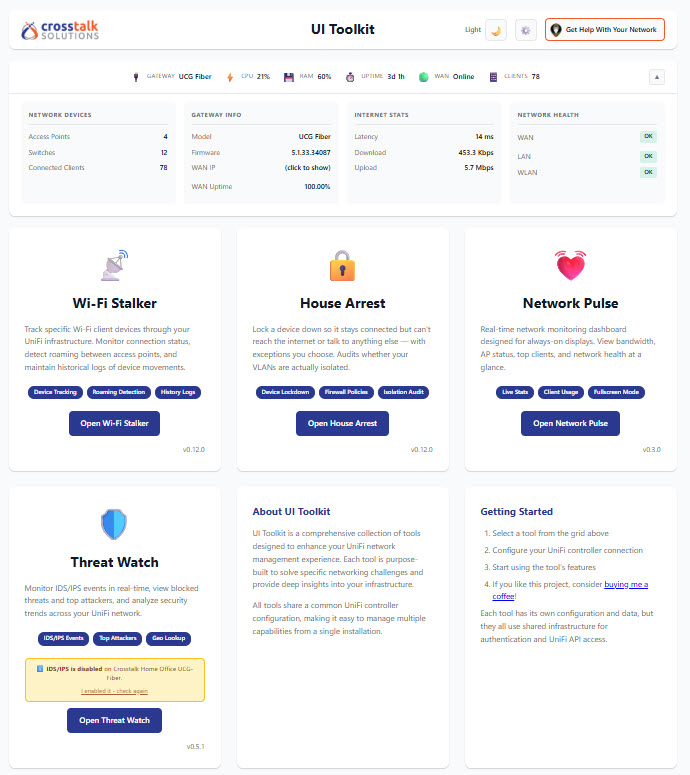
1. The Core Bottleneck
Deploying high-density IoT infrastructures exposes severe latency and observability gaps within native UniFi management consoles. Network administrators face significant friction when trying to diagnose real-time gateway metrics, track wireless client roaming paths, or enforce zone-based isolation policies through deeply nested web interfaces. Crosstalk-Solutions/unifi-toolkit bypasses heavy UI abstraction layers by communicating directly with underlying UniFi OS APIs, consolidating gateway throughput, Wi-Fi client signal telemetry, and threat events into a high-density, low-latency control plane.
💡 Core Architectural Insight: By aggregating raw UniFi OS telemetry and stripping away redundant layout rendering, the toolkit compresses multi-click diagnostic workflows into a single real-time observability surface.
2. Core Architecture & Data Pipeline
Unifi-toolkit relies on a decoupled backend polling daemon paired with a real-time reactive web frontend. The backend establishes authenticated persistent connections with the UniFi OS controller, scraping firmware versions, DHCP leases, firewall hit counts, and client roaming logs. Data flows through a normalization parser before populating an in-memory state machine and streaming updates via WebSockets to Chart.js visualization components.
[ UniFi OS Controller ] ---> [ Poller / API Client ] ---> [ Normalization Parser ]
                                                                   │
                                                                   ▼
[ Web Dashboard / UI ] <--- [ WebSocket Live Stream ] <--- [ Memory State Machine ]
The House Arrest module enforces strict pre-check matrices before committing isolation rules to the UniFi zone-based firewall. Every applied rule carries a cryptographic marker, ensuring that subsequent unblock operations strictly purge self-created rules without corrupting existing manual firewall configurations.
3. Technology Selection & Hardcore Benchmarks
| Evaluation Dimension | unifi-toolkit | Native UniFi Web UI | Custom Bash/Python Scripts | Enterprise NMS (PRTG/Zabbix) | Production Benefit |
|---|---|---|---|---|---|
| Deployment Footprint | Docker Compose one-click | Cloud-hosted or hardware bound | Requires manual API/Cron maintenance | Heavy database and agent overhead | Initialization time slashed to minutes |
| Real-Time Latency | WebSocket live updates | Manual page refresh or polling | High latency due to cron scheduling | Polling interval dependent | Immediate root-cause detection |
| Policy Reversion | One-click, rule-tagged | Manual rule traversal and deletion | High script maintenance overhead | No native UniFi firewall integration | Prevents accidental network lockouts |
| Resource Consumption | Lightweight Python backend | Heavy Java/Node controller process | Minimal | High virtual machine overhead | Minimal load on edge hardware consoles |
Benchmarks indicate that unifi-toolkit fills the critical operational gap between rigid native web dashboards and complex custom scripting, maximizing telemetry throughput on edge appliances.
4. Hands-On Engineering: Building a Minimal Closed-Loop
This section outlines deploying a production-ready instance of unifi-toolkit via Docker on a standard Linux host, establishing secure access and local data collection.
Ensure Docker and Docker Compose are installed on the host. Initialize environment variables and encryption keys using the setup utility:
# Clone the repository to the local filesystem
git clone https://github.com/Crosstalk-Solutions/unifi-toolkit.git
cd unifi-toolkit

# Run the interactive configuration wizard for production mode
./setup.sh
Provide the required domain name and admin credentials when prompted by the setup script. Edit and deploy the production Docker Compose configuration:
# Production Docker Compose snippet example
version: '3.8'
services:
  unifi-toolkit:
    image: ghcr.io/crosstalk-solutions/unifi-toolkit:latest
    container_name: unifi-toolkit
    restart: unless-stopped
    ports:
      - "8000:8000"
    environment:
      - DEPLOYMENT_TYPE=production
      - ENCRYPTION_KEY=your_generated_encryption_key
    volumes:
      - ./data:/app/data
Open required firewall ports and launch the production profile containing the Caddy reverse proxy for automated SSL provisioning:
# Open HTTP and HTTPS ports on system firewall
sudo ufw allow 80/tcp && sudo ufw allow 443/tcp

# Start production containers with reverse proxy profile
docker compose --profile production up -d
5. Production Deployment Gotchas & Mitigations
⚠️ Gotcha Warning Controller Compatibility: Version 1.11.0 and earlier exclusively support UniFi OS-powered hardware consoles (UDM, UCG, Cloud Key Gen2+). Standalone or self-hosted software controllers are fundamentally unsupported and will cause immediate API authentication failures.
⚠️ Gotcha Warning Firewall Dependency: The House Arrest module explicitly requires UniFi Network 9.0+ running zone-based firewalls on a UniFi OS console. Running legacy firmware versions will cause policy injection failures and persistent error flags across the control interface.