
1. The Core Bottleneck: What Engineering Dead Ends Were Smashed?
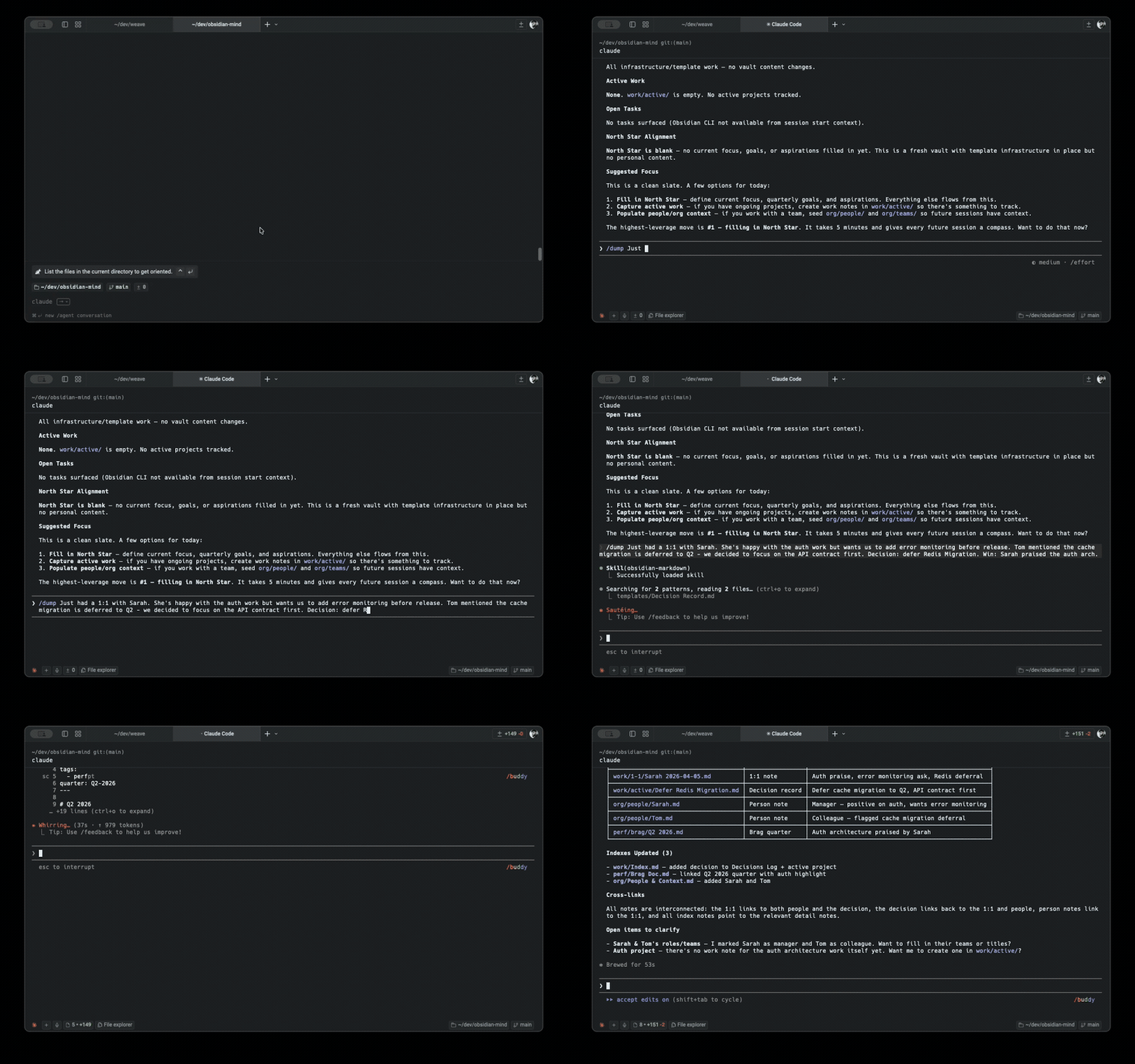
A fatal flaw plagues mainstream AI coding agents in production environments: session resets. Every time a developer fires up a terminal session, the agent faces a blank slate. It lacks awareness of architectural decisions reached by the team yesterday, remains blind to trade-offs confirmed in last week's review, and cannot correlate performance metrics with ongoing milestones. Engineers must repeatedly brief the agent on project context in every fresh shell window. Knowledge evaporates across disjointed dialogs, degrading engineering velocity through constant context rebuilding.
obsidian-mind bypasses proprietary vector databases and SaaS lock-in. Instead, it upgrades an existing Obsidian knowledge base into a persistent agent brain. Combining a structured directory layout, CLI tooling, and the Model Context Protocol (MCP), the agent automatically mounts project north stars, active tasks, and historical decisions upon initialization. Sessions transform from isolated sandboxes into a continuous engineering pipeline that compounds knowledge over time.
💡 Core Architecture Insight: Standardizing a local Markdown repository as the primary long-term memory source for agents, combined with MCP state exposure, eliminates the privacy risks and high API bills of cloud-based vector stores.
2. Core Architecture and Data Flow Analysis
The system relies on tight coupling between entry-point agent hooks, intermediate parsing layers, and the underlying Markdown vault. When a user initiates a session, initialization scripts read core metadata, injecting active projects, open tasks, and recent Git changes into the prompt context. Subsequently, the Model Context Protocol server spins up a unified query contract locally, empowering the main chat and sub-agents to access vector indexes through standardized tool calls.
[ User / Terminal CLI ] ---> [ ShardMind / Git Vault ] ---> [ SessionStart Hook ]
                                                                   │
                                                                   ▼
[ QMD Local Models ] <---> [ MCP Server Wrapper ] <---> [ Obsidian Markdown Vault ]
Data flow exhibits modular decoupling. The QMD retrieval module orchestrates three lightweight models locally. embeddinggemma-300M maps notes and queries into high-dimensional vectors; qmd-query-expansion-1.7B dynamically rewrites ambiguous search terms; a reranker model precisely filters recall results. Computation runs entirely offline without external network dependencies, resolving all queries within a local SQLite store. Binding the index name to the vault path ensures clean multi-instance isolation across shared workstations.
3. Technical Selection and Hardcore Benchmarks
| Selection Dimension | This Solution (obsidian-mind) | Traditional Paradigm | Typical Competitor Solutions | Production Yield |
|---|---|---|---|---|
| Memory Persistence | Local Standard Markdown Files | Scattered Chat Logs or Private DBs | Cloud Knowledge Base SaaS | Full local control with Git versioning |
| Retrieval Architecture | QMD Local 3-Model Pipeline (300M~1.7B) | Basic Grep or Closed-loop Embedding | Dependent on OpenAI Remote Embedding API | Zero API costs, fully offline, zero data leaks |
| Agent Integration | Native Claude Code, Codex, Gemini | Single IDE Plugin or Web Chat Window | Standalone Desktop Client Applications | Seamless terminal workflow integration |
| Deployment Overhead | One-click CLI init, minimal sidecar | Complex microservices & container orchestration | Tedious account registration & data import | Minimal closed-loop built in minutes |
The elegance of this technical selection lies in rejecting over-engineering. It avoids heavy database clusters, leveraging familiar Markdown for storage exchange, Git for multi-device sync, and local small models for semantic precision. This architecture strikes a balance between maintainability and feature completeness.
4. Hands-on Geek Guide: Building a Minimal Closed-Loop
Ensure Node.js and the Obsidian client are installed locally before building the persistent memory vault. Installing the ShardMind package manager globally allows quick retrieval and initialization of the repository template.
# Install the ShardMind package manager globally
npm install -g shardmind

# Create and enter a fresh vault directory
mkdir my-obsidian-mind && cd my-obsidian-mind

# Run the initialization wizard to clone template and setup metadata
shardmind install github:breferrari/obsidian-mind

# Install the local semantic search utility QMD
npm install -g @tobilu/qmd

# Execute bootstrap script to build local SQLite vector index and embeddings
node --experimental-strip-types .scripts/qmd-bootstrap.ts
After executing these commands, open the directory as a local vault in Obsidian. Enable CLI support in Obsidian settings, then start the Claude Code agent directly in the terminal. The agent automatically reads target configurations from brain/North Star.md and outputs active project statuses and tasks when executing /om-standup.
5. Production Pitfalls and Gotchas
When synchronizing the vault across multiple machines, frequent Git conflicts may corrupt .mcp.json or local SQLite index files. Explicitly exclude local build cache directories such as .qmd/ in .gitignore, tracking only pure Markdown notes. Re-run the bootstrap script to rebuild local embedding indexes whenever switching development environments across machines.
⚠️ Gotcha Warning [Index Version Drift]: A sudden drop in recall precision after bulk-importing historical notes usually stems from outdated local vector stores. Always execute
qmd --index <vault-name> updatefollowed byembedafter bulk file modifications.
Additionally, when running multiple concurrent agent instances reading and writing to the same vault, Obsidian CLI local file watching may trigger momentary race conditions. Plan sub-agent task boundaries carefully to prevent multiple automation scripts from appending high-frequency, lockless writes to the same Decision Record directory.